Ever had a picker walk the whole warehouse looking for a pallet that the system says is “in stock”? The goods arrived. The GRN was posted. But nobody knows where the pallet went.
That is a putaway problem. And it is more common than most warehouse managers like to admit.

In this guide, we will cover what it means, how the process works step by step, seven storage strategies, how it works in manufacturing plants, the KPIs to track, and how a warehouse management system (WMS) makes it all run on autopilot.
What is putaway in a warehouse?
Putaway is the process of moving received goods from the receiving dock to their storage location, and recording that location in your system. Once that is done, the stock can be found and picked.
Think of it like parking in a big mall. Parking the car is easy. Remembering where you parked is the hard part. This step does both: placing the goods and saving the exact spot.
Putaway meaning in simple words: goods ko sahi jagah par rakhna aur system mein uski location save karna.
Why does it matter so much? Because this one step decides three things:
- How fast your team can pick orders
- How accurate your stock records are
- How much floor space you lose to pallets parked in aisles
Where putaway fits in inbound logistics
It is the last step of inbound. Until it is done, your stock exists on paper but not at any location a picker can reach.
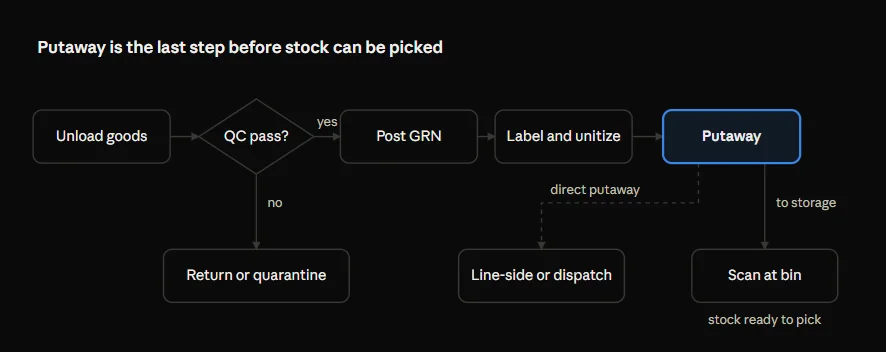
Notice two things in the flow above. First, goods that fail QC never reach storage. Second, goods with a known destination can skip storage and go straight to the production line or dispatch. That shortcut is called direct putaway.
The putaway process, step by step
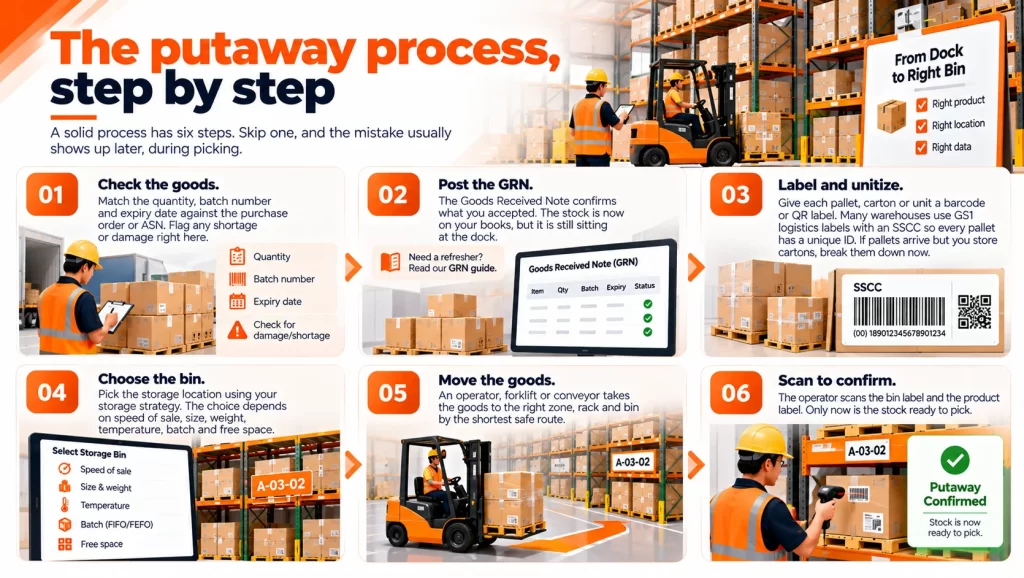
A solid process has six steps. Skip one, and the mistake usually shows up later, during picking.
- Check the goods. Match the quantity, batch number and expiry date against the purchase order or ASN. Flag any shortage or damage right here.
- Post the GRN. The Goods Received Note confirms what you accepted. The stock is now on your books, but it is still sitting at the dock. (Need a refresher? Read our GRN guide.)
- Label and unitize. Give each pallet, carton or unit a barcode or QR label. Many warehouses use GS1 logistics labels with an SSCC so every pallet has a unique ID. If pallets arrive but you store cartons, break them down now.
- Choose the bin. Pick the storage location using your storage strategy. The choice depends on speed of sale, size, weight, temperature, batch and free space.
- Move the goods. An operator, forklift or conveyor takes the goods to the right zone, rack and bin by the shortest safe route.
- Scan to confirm. The operator scans the bin label and the product label. Only now is the stock ready to pick.
Here is the catch: step 6 is the one most warehouses skip. Without that scan, your system shows stock that nobody can find.
7 putaway strategies (and when to use each)
Is there one best strategy? Not really. Most warehouses mix two or three, based on zone or product type.
| Strategy | How it works | Best for | Watch out for |
|---|---|---|---|
| Fixed location | Each SKU has a permanent bin | Few SKUs, spare parts, teams that pick from memory | Bins sit empty when a SKU runs out |
| Random (dynamic) | Goods go to any free bin that fits | Many SKUs, seasonal stock, e-commerce | Impossible to run without a WMS |
| Velocity-based (ABC) | Fast movers go near dispatch, slow movers go to the back | Order picking, D2C, FMCG | Needs regular re-slotting |
| Zone-based | Goods go to a zone by type: cold, hazardous, high-value, bulky | Pharma, food, chemicals, electronics | Some zones fill faster than others |
| Batch or expiry-driven | Bins chosen so FEFO or FIFO picking stays easy | Pharma, food and beverage, FMCG | Mixed batches in one bin break traceability |
| Direct putaway | Goods skip storage and go straight to dispatch or the line | Pre-allocated orders, urgent refills | Outbound order must be ready first |
| Closest open bin | Nearest empty bin to the dock | Overflow, peak season | Scatters one SKU across the floor if overused |
Fixed vs random putaway
This is the debate most teams have first. Fixed location is easy to run on paper. Random storage uses your racks better, because no bin is held for stock you don’t have. The trade-off? Random only works when a system tracks every bin.
Want to sort SKUs into fast and slow movers first? Our ABC analysis guide shows how.
What is directed putaway?
Directed putaway is not an eighth strategy. It is how a WMS applies these rules for you. The system reads the product, quantity, speed of sale and free space, then tells the operator exactly which bin to use.
Putaway in manufacturing plants
In a factory, incoming goods have more than one destination. Goods can go to the store, to the production line, or to the finished goods warehouse.
- To the raw material store. Parts from suppliers are checked and stored, usually batch-wise, so the oldest lot is issued first.
- To line-side. Fast-used parts can go straight to line-side locations next to the assembly line. This saves a second move, but only if line-side bins are tracked like any other bin.
- To finished goods. Output from the line is put away in the FG warehouse, ready for dispatch.
- Back from the line. Unused material returned from the shop floor must be put away again. Otherwise, your store balance slowly drifts from reality.
So where do plants usually go wrong? Stores and line-side often run on different systems, or on none at all. Material leaves the store on a paper slip, and nobody knows how much is sitting at the line. That is exactly the gap in-plant logistics closes, by tracking material from dock to store to line in one system.
Common putaway problems in Indian warehouses
Most of these problems share one root cause. The bin is chosen in someone’s head and written on paper, if it is written at all.
| Problem | Why it happens | What it costs you |
|---|---|---|
| Stock in the wrong bin | Operator picks a handy bin, no scan check | Pickers can’t find stock; orders ship short or late |
| Pallets parked in aisles | Storage falls behind after a heavy inbound day | Blocked aisles, slower picking, safety risk |
| Double handling | Goods staged, moved, then moved again | Extra labour hours per pallet |
| Mixed batches in one bin | No batch-wise bin rule | FEFO breaks, expiry losses, failed recalls |
| Overfilled bins | Nobody knows bin capacity | Damaged goods, rack overload |
| Stock on books, not on the floor | GRN posted but bin never confirmed | Phantom stock and wrong reorder decisions |
Blocked aisles are not just slow. They are a safety risk too. OSHA lists forklifts and material handling among the main hazards in warehousing.
Festive seasons make all of this worse. Inbound jumps before Diwali sales, the team stays the same size, and storage is the first step to fall behind.
How a WMS automates putaway
A WMS turns this step from a decision into an instruction. Instead of asking “where should this go?”, the operator simply follows the bin shown on the handheld.
Here is what changes:
| Step | Manual or Excel | With a WMS |
|---|---|---|
| Choosing the bin | Supervisor decides from memory | System suggests a bin based on your rules |
| Recording the location | Written on a slip, typed in later | Scanned at the bin, updated instantly |
| Batch and expiry | Often mixed in one bin | Kept apart so FEFO and FIFO work |
| Pallet-to-carton breakdown | Counted by hand | Unit conversion done in the system |
| Backlog | Seen only when aisles are blocked | Visible as open tasks on a dashboard |
| Operator output | Unknown | Tracked per operator |
Putaway with Omneelab WMS
Omneelab WMS tracks stock down to zone, rack, bin, SKU and unit. So every move has an exact address. On top of that, each serial and batch is traced from GRN to dispatch, which keeps FEFO picking intact for pharma, FMCG and auto parts.
A few more features help:
- Unitization: goods received as pallets and stored as boxes or pieces stay correctly counted at every level.
- In-Plant Logistics: material moves between store, line-side and warehouse in the same system.
- Workforce productivity: storage tasks are tracked per operator, next to unloading, QC and picking.
- ERP sync: two-way sync with SAP, Tally and other ERPs, so nobody re-types a bin location.
Putaway KPIs every warehouse should track
How do you know if it is working? Four numbers tell you. Track them weekly, and daily during peak season.
1. Dock-to-stock time
This is how long goods wait between arriving and being ready to pick. Lower is better.
2. Putaway accuracy
This is the share of pallets that landed in the correct bin. You check it during cycle counts.
3. Moves per labour hour
This shows how productive your storage team is.
4. Putaway backlog
This counts pallets or lines received but not yet put away at the end of a shift. Anything above zero is stock you own but cannot sell.
Quick example: a warehouse receives 400 pallets in a day. A cycle count checks 200 of them and finds 194 in the right bin. So accuracy is 194 ÷ 200 × 100 = 97%. Those six misplaced pallets are the ones your pickers will hunt for tomorrow.
For more metrics, see our warehouse KPI dashboard guide.
Putaway best practices
Ready to tighten up your process? Start with these:
- Label everything. Every bin gets a barcode or QR code, and so does every pallet or carton at receiving.
- Make the bin scan mandatory. No scan, no stock available to pick.
- Keep fast movers close to dispatch. Review your ABC classes every quarter.
- One batch per bin for anything with an expiry date.
- Set bin capacity by volume and weight, so a full bin is never suggested.
- Clear the dock every shift. Aim for zero backlog.
- Use direct putaway when the order or production need is already known.
- Re-slot when demand shifts. Our warehouse slotting guide explains how.
- Audit bin accuracy in every cycle count. See our cycle counting best practices.
Conclusion: get putaway right, and picking gets easier
Putaway is where inventory accuracy is won or lost. Let’s recap the key points:
- Putaway moves goods from the dock to a bin and records that bin.
- A good process has six steps, and the final bin scan matters most.
- Most warehouses mix two or three strategies, such as ABC, zone-based and batch-driven.
- In plants, it also covers line-side and finished goods.
- Dock-to-stock time, accuracy, moves per hour and backlog tell you if it is working.
The simplest fix is a system that tells your team where every item goes, and checks that it got there.
Want to see directed putaway in action? Book a free demo of Omneelab WMS and watch goods move from dock to bin, in your warehouse and on your shop floor.
FAQs about putaway
In a WMS, it is a system-directed task. The WMS suggests the bin based on rules like velocity, zone, batch and free space. The operator then confirms the move by scanning the bin and the product.
GRN records that goods were received and accepted. Putaway moves those goods into storage and records where they are. In short, GRN puts stock on your books, and the next step puts it in a pickable location.
Putaway is the daily task of storing incoming goods. Slotting is the bigger plan that decides which products belong in which locations. Good slotting makes storing faster.
Direct putaway takes goods straight from the dock to their final bin, line or dispatch. The indirect method first sends goods to a staging area for labelling, breakdown or checks, and then to the final bin.
Putaway ka matlab hai prapt maal ko godown mein uski tay jagah par rakhna aur system mein us jagah ko record karna.

Kapil Pathak is a Senior Digital Marketing Executive with over six years of experience specializing in the logistics and supply chain industry. His expertise spans digital strategy, search engine optimization (SEO), search engine marketing (SEM), and multi-channel campaign management. He has a proven track record of developing initiatives that increase brand visibility, generate qualified leads, and drive growth for D2C & B2B technology companies.