This WMS implementation checklist and go-live guide is built for Indian warehouses that want the rollout to go right the first time. Rolling out a warehouse management system is one of the highest-impact projects an Indian supply chain team can take on, and one of the easiest to get wrong. Done well, a WMS sharpens inventory accuracy to 99%+, cuts order cycle times, and turns a chaotic floor into a predictable fulfilment engine. Done poorly, it stalls dispatches, frustrates pickers, and burns budget on a system nobody trusts.

The difference almost always comes down to preparation and a disciplined go-live. A great WMS implementation is not really a software installation; it is an operational change programme that happens to involve software. This guide gives you a complete, India-specific WMS implementation checklist and go-live roadmap, covering discovery, data migration, integrations, UAT, training, cutover, and post-launch stabilisation, so your team can move from kickoff to a confident, stable go-live.
Whether you are a fast-scaling D2C brand, a 3PL operator running multiple client accounts, a manufacturer, or a quick-commerce dark-store network, the principles below apply. Indian warehouses carry extra considerations too, GST and e-way bill compliance, marketplace integrations with Flipkart, Amazon, Meesho and ONDC, multilingual floor staff, and patchy connectivity in tier-2 and tier-3 locations, and this guide addresses each of them directly.
What Is WMS Implementation (and Why “Go-Live” Deserves Its Own Plan)
WMS implementation is the end-to-end process of configuring, integrating, testing, and deploying a warehouse management system so it controls your inbound, storage, and outbound operations in real time. It spans business-process mapping, master-data preparation, system configuration, hardware setup (scanners, printers, Wi-Fi), integration with your ERP and sales channels, user acceptance testing, staff training, and the cutover to live operations.
“Go-live” is the moment the warehouse starts running on the new system for real transactions. It deserves a dedicated plan because it is the single riskiest hour-to-hour window of the whole project. Every prior phase can go smoothly and a rushed cutover can still cause stockouts, mis-ships, and a loss of team confidence. Treating go-live as its own mini-project, with a cutover runbook, a command centre, rollback criteria, and hypercare support, is what separates smooth launches from painful ones.
This is exactly why a structured WMS implementation checklist matters: it forces every dependency into the open before go-live, when fixes are cheap. It helps to be clear on where a WMS sits relative to neighbouring systems. An ERP manages finance, procurement, and overall business records; an order management system (OMS) routes and orchestrates orders across channels; a WMS controls what physically happens inside the four walls of the warehouse, receiving, putaway, picking, packing, and dispatch. These systems are complementary, and a clean integration between them is central to a successful implementation.
How Long Does a WMS Implementation Take in India?
Timelines vary with warehouse complexity, the number of integrations, and how clean your existing data is. As a planning baseline:
A single-site, cloud-based WMS for a small or mid-sized operation with standard processes and one or two integrations typically takes 6 to 12 weeks. A multi-warehouse rollout, a 3PL with several client accounts, or a deployment with deep ERP and marketplace integrations and custom workflows usually runs 3 to 6 months. Large, highly automated facilities with conveyor, sortation, or robotics interfaces can take longer still.
The biggest schedule killers are rarely the software itself. They are dirty master data, unclear processes that have to be redesigned mid-project, slow decision-making on the client side, and underestimating training. A realistic WMS implementation checklist builds buffer into the plan for these, and protects the go-live date by freezing scope once UAT begins.
How Much Does WMS Implementation Cost in India?
Budgeting is part of any thorough WMS implementation checklist, because the total cost of a WMS goes well beyond the software licence and surprises mid-project are expensive. Build your business case around the full picture so stakeholders approve the right number the first time.
Costs typically fall into a few buckets. Software is usually a per-user or per-transaction subscription for a cloud WMS, or a larger upfront licence for on-premise; cloud models lower the entry cost and remove server maintenance, which is why most Indian SMBs and 3PLs now prefer them. Implementation services cover configuration, data migration, integrations, and project management, often the largest line item for complex rollouts. Hardware includes scanners, handheld devices, label and thermal printers, RFID readers, and Wi-Fi infrastructure. Training and change management carry a real cost in time even when delivered in-house. Finally, budget for ongoing costs, subscription renewals, support, and future enhancements.
For Indian operations, a cloud WMS for a small or mid-sized single-site warehouse is generally the most cost-effective starting point, with predictable monthly pricing and a faster path to value. Larger, multi-site, or heavily integrated deployments cost more because of the additional configuration, integration, and testing effort. The smartest way to control cost is not to cut corners on data, testing, or training, those savings reappear as expensive problems after go-live, but to scope tightly, phase the rollout, and choose a WMS whose standard features already match most of your processes so you minimise custom development.
The WMS Implementation Checklist: Phase by Phase
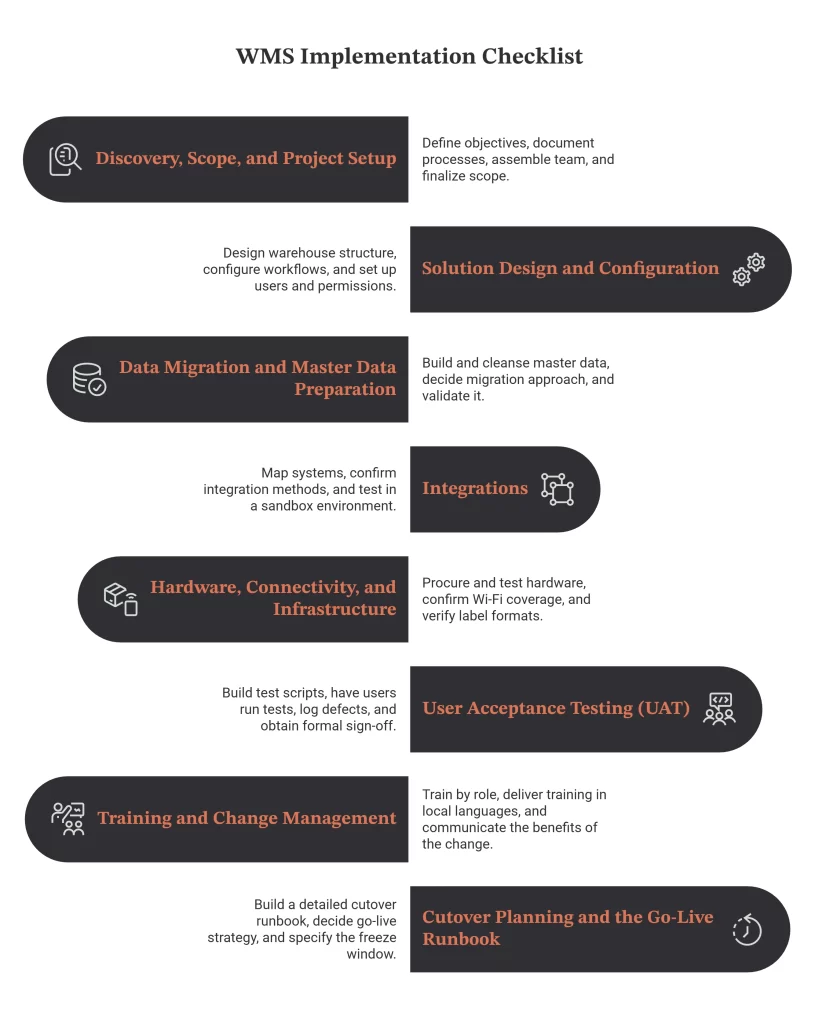
The following is a complete, sequential WMS implementation checklist. Use it as your project backbone and adapt the detail to your operation.
Phase 1: Discovery, Scope, and Project Setup
Every successful WMS rollout starts before any configuration happens, with a clear definition of what you are trying to achieve and how you will know you succeeded.
Begin by documenting your current-state processes, how goods are received, where they are stored, how orders are picked and packed, and how dispatch and returns work today. Walk the floor and map the actual flow, not the idealised one. From there, define the future-state processes you want the WMS to enable, and capture the gaps between them.
Set measurable objectives. Typical targets include inventory accuracy above 99%, order accuracy above 99.5%, faster receiving-to-putaway time, higher picks per hour, and reduced order cycle time. These become your acceptance criteria later, so make them specific and baseline your current numbers now.
Assemble a cross-functional project team and name owners. You will need an executive sponsor, a project manager, a warehouse operations lead, an IT/integration owner, key floor “super-users,” and a counterpart from your WMS vendor. Agree how decisions get made and how often you will meet.
Finalise scope and constraints in writing: which sites and processes are in scope, which integrations are required, the budget, and the target go-live date. A signed scope document prevents the slow scope creep that derails so many projects.
Phase 2: Solution Design and Configuration
With requirements agreed, the WMS is configured to match your operation. This is where business-process mapping turns into system setup.
Design the warehouse structure in the system: zones, aisles, racks, bins, and storage types, along with putaway and picking strategies (such as FIFO, FEFO for perishables and pharma, or LIFO where relevant). Define how SKUs are slotted, fast-movers near dispatch, bulky items in appropriate locations, because good slotting drives picking productivity from day one.
Configure your core workflows: inbound (ASN, GRN, quality check, putaway), storage and replenishment, outbound (order allocation, wave or batch picking, packing, manifesting, dispatch), and returns/reverse logistics. For Indian operations, configure batch and expiry tracking where you handle FMCG, food, or pharma, and serial-number traceability where you handle electronics, automotive parts, or high-value goods.
Set up users, roles, and permissions, and define the standard operating procedures that will govern each task. Document configuration decisions as you go, this becomes invaluable for training, audits, and future changes.
Phase 3: Data Migration and Master Data Preparation
Data quality is the number-one determinant of go-live success. A WMS is only as accurate as the master data you feed it.
Build and cleanse your SKU/item master: unique codes, descriptions, units of measure, dimensions, weights, barcodes, and handling attributes. Eliminate duplicates and retire dead SKUs. Prepare location master data for every bin and zone, supplier and customer masters, and opening stock balances by location and, where applicable, by batch and serial number.
Decide your migration approach and validate it. Export from legacy systems, map fields to the WMS schema, load into a test environment first, and reconcile counts against physical reality. Plan a physical stock count (or a series of cycle counts) close to go-live so opening balances are trustworthy. Treat data cleansing as a project workstream with its own owner and deadline, not an afterthought.
Phase 4: Integrations
Integrations are what make a WMS part of a connected supply chain rather than an island. Map every system the WMS must talk to and the direction of each data flow.
The most common integrations for Indian businesses include the ERP (for purchase orders, sales orders, invoicing, and financial postings), ecommerce and marketplace channels (Shopify, WooCommerce, Magento, plus Flipkart, Amazon, Meesho, Myntra, Nykaa, JioMart, Ajio, and ONDC), quick-commerce platforms (Blinkit, Zepto, Instamart) for dark-store fulfilment, shipping and courier aggregators for label generation and tracking, and GST/e-way bill systems for compliant documentation.
For each integration, confirm the method (API, EDI, flat file), the data fields, sync frequency (real-time vs batch), and error-handling rules. Test in a sandbox before connecting to production. Pay special attention to inventory sync logic across marketplaces to avoid overselling, a single source of truth for stock is one of the biggest payoffs of a WMS.
Phase 5: Hardware, Connectivity, and Infrastructure
Software runs on the floor through hardware, and in India connectivity planning is non-negotiable.
Procure and test barcode scanners, mobile/handheld devices, label and thermal printers, and any RFID readers you will use. Confirm Wi-Fi coverage across the entire warehouse, including cold rooms, mezzanines, and dock areas where signal often drops. For tier-2 and tier-3 sites with unreliable internet, confirm how the WMS behaves during outages and whether offline or store-and-forward modes are available.
Verify label formats and barcode symbologies, set up printers, and standardise device configurations. If you are deploying a cloud WMS, confirm bandwidth and a failover connection. Hardware readiness issues discovered on go-live day are entirely avoidable with a pre-launch infrastructure check.
Phase 6: User Acceptance Testing (UAT)
UAT is where you prove the configured system handles your real-world scenarios before you trust it with live orders. Skipping or shortcutting UAT is one of the most common reasons WMS implementations fail.
Build test scripts that mirror your actual operations end to end: receive a purchase order, run quality checks, putaway, allocate and pick an order, pack, manifest, dispatch, and process a return. Include edge cases, partial receipts, short picks, damaged goods, cancellations, multi-batch orders, and high-volume waves. Test every integration with real data flowing between systems.
Have the people who will actually use the system run the tests, not just IT. Log every defect, prioritise fixes, retest, and only sign off when critical and high-priority issues are resolved. Require formal UAT sign-off from operations before scheduling go-live. This sign-off is your gate; do not move it for convenience.
Phase 7: Training and Change Management
Technology adoption fails on people, not features. A WMS changes how every floor worker does their job, so treat training and change management as a core deliverable.
Train by role, receiving clerks, putaway staff, pickers, packers, dispatch, supervisors, and admins each need relevant, hands-on sessions on the devices they will use. In Indian warehouses, deliver training in the languages your floor staff actually speak, and use visual, practical demonstrations rather than dense manuals. Create quick-reference SOPs and on-device guides.
Identify and empower super-users who can support peers during and after go-live. Communicate the “why” behind the change so staff understand the benefits to them, less rework, fewer disputes, clearer tasks. Address resistance early and openly. A confident, well-trained team is the single best predictor of a smooth launch.
Phase 8: Cutover Planning and the Go-Live Runbook
Before go-live, build a detailed cutover runbook, an hour-by-hour plan of exactly what happens during the transition from the old way to the new system.
Decide your go-live strategy. A phased rollout (one process, zone, or client account at a time) reduces risk and is well suited to multi-warehouse and 3PL environments. A parallel run (old and new systems operating together briefly) adds a safety net at the cost of double data entry. A big-bang cutover is fastest but riskiest and should only be chosen with strong UAT confidence and a clear rollback plan.
Your cutover runbook should specify the freeze window for transactions, the final stock count and opening-balance load, the sequence of system switch-overs, who does what and when, communication checkpoints, and explicit rollback criteria, the conditions under which you would revert, and how. Schedule go-live for a lower-volume window where possible, and make sure key vendor and internal resources are on standby.
The Go-Live Day: A Step-by-Step Playbook
Go-live day is execution, not problem-solving. If the earlier phases were done well, this day is about disciplined sequencing and fast support.
Start by confirming readiness against your final WMS implementation checklist: UAT signed off, data migrated and reconciled, integrations live and tested, hardware working, staff trained, and the support team in place. Hold a short go/no-go meeting with the project sponsor and operations lead, and make the call based on agreed criteria rather than optimism.
Freeze transactions in the legacy system, complete the final stock count, and load verified opening balances into the WMS. Switch on integrations in the planned sequence and confirm each is syncing correctly. Then begin live operations, typically starting with inbound, then moving through storage and outbound as volume builds.
Stand up a command centre for the day: a small, empowered group (project manager, operations lead, IT, and a vendor contact) who triage issues in real time. Floor super-users escalate problems quickly; the command centre decides and communicates. Monitor the first transactions of each type closely, the first receipt, first putaway, first pick, first dispatch, and confirm each flows end to end before scaling volume.
Watch your early indicators: inventory accuracy, order accuracy, scan success rates, integration error logs, and throughput. Keep communication flowing to the wider team so everyone knows the launch is progressing. If a serious, unrecoverable issue appears and meets your rollback criteria, execute the rollback calmly per the runbook, that is exactly why you wrote it.
Hypercare: The First Two to Four Weeks After Go-Live
Go-live is the start of stabilisation, not the finish line. The hypercare period, typically two to four weeks, is when you provide heightened support and tune the system against real operating conditions.
Keep extra support on the floor and a fast escalation path to the project team and vendor. Hold a short daily stand-up to review issues, throughput, and accuracy, and to prioritise fixes. Expect a temporary dip in productivity as staff build muscle memory; this is normal and recovers quickly with support.
Use this window to fine-tune configuration, picking paths, slotting, wave sizes, replenishment triggers, based on what the data now shows. Reinforce training where you see recurring errors. Track your go-live success metrics against the baselines you set in Phase 1, and share progress with stakeholders so the wins are visible.
Once accuracy and throughput stabilise at or above target and the issue list is under control, formally exit hypercare, transition to business-as-usual support, and capture lessons learned for the next site or client rollout.
A WMS Go-Live Readiness Checklist (Quick Reference)
Use this condensed WMS implementation checklist as your final gate before committing to go-live:
- Current and future processes documented; success metrics baselined
- Project team, owners, and decision rights agreed; scope frozen
- WMS configured for zones, bins, putaway/picking strategies, and workflows
- Batch/expiry and serial tracking configured where required
- SKU, location, supplier, customer masters cleansed and loaded
- Opening stock counted, reconciled, and verified
- ERP, marketplace, courier, and GST/e-way bill integrations live and tested
- Scanners, printers, devices, and Wi-Fi coverage verified across the site
- Offline/connectivity contingency confirmed for tier-2/3 locations
- UAT completed and signed off by operations, including edge cases
- Staff trained by role and language; super-users identified
- SOPs and quick guides available on the floor
- Cutover runbook written, with sequence, owners, and rollback criteria
- Command centre and hypercare support staffed and scheduled
- Go/no-go meeting held and decision recorded
Treat every line above as a hard gate rather than a nice-to-have. If even one item is amber, the right call is usually to hold the date rather than push a fragile launch into live operations, because a slipped go-live costs days while a failed one can cost weeks of recovery and lost trust. Assign each item a named owner, review the full list in a readiness meeting a few days before launch, and record the status of every gate in writing. That paper trail makes the final go or no-go decision objective, keeps stakeholders aligned, and gives you a reusable template for the next site or client rollout.
India-Specific Considerations You Cannot Skip
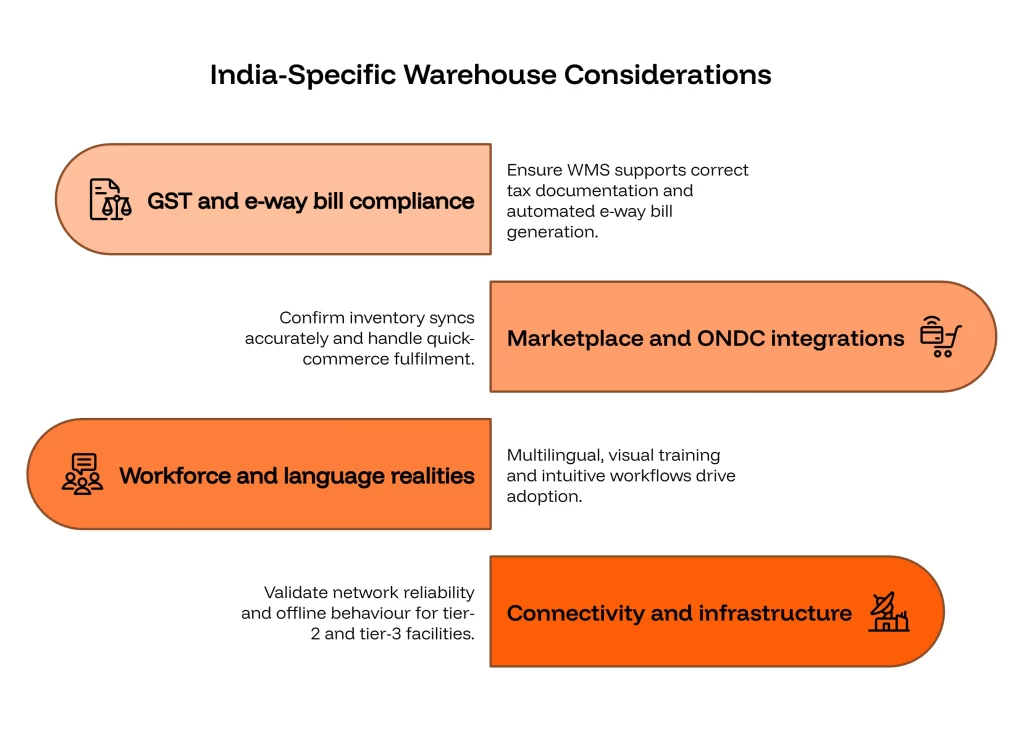
Indian warehouse operations carry requirements that generic global checklists tend to miss, and addressing them up front prevents compliance and adoption problems later.
GST and e-way bill compliance must be built into your outbound and documentation flows. Ensure the WMS (via ERP or direct integration) supports correct tax documentation and automated e-way bill generation for goods movement above the threshold, so dispatches are not held up.
Marketplace and ONDC integrations are central for most Indian sellers and 3PLs. Confirm that inventory syncs accurately across Flipkart, Amazon, Meesho, Myntra, Nykaa, JioMart, Ajio, and ONDC, and that quick-commerce dark-store fulfilment for Blinkit, Zepto, and Instamart is handled with the speed those channels demand.
Workforce and language realities matter on the floor. Multilingual, visual training and intuitive handheld workflows drive adoption among diverse warehouse teams far better than English-only manuals.
Connectivity and infrastructure vary widely outside metro hubs. For tier-2 and tier-3 facilities, validate network reliability and offline behaviour before go-live rather than discovering gaps on launch day.
Why WMS Implementations Fail, and How This Checklist Prevents It
Most failed or troubled WMS projects share a small set of root causes, and each maps to a phase above. Poor or dirty master data undermines accuracy from day one, Phase 3 prevents it. Inadequate testing lets defects reach the floor, Phase 6 catches them. Weak training and change management stall adoption, Phase 7 addresses it. A rushed, unplanned cutover turns a good system into a bad launch, Phase 8 and the go-live playbook control it. And unclear scope or absent executive sponsorship lets projects drift, Phase 1 anchors them.
Working through a disciplined WMS implementation checklist closes each of these gaps in turn. The common thread is that success is engineered before go-live, not rescued after it. Follow the phases in order, hold the gates (especially UAT sign-off and the go/no-go decision), and resist the temptation to compress the timeline by skipping preparation. The hours you invest in data, testing, and training are repaid many times over in a stable launch.
Defining Go-Live Success: Metrics to Track
You cannot manage what you do not measure, so define success in numbers before launch and track them from day one. The metrics you baselined in Phase 1 become your scorecard during hypercare and beyond.
Focus on a tight set of operational KPIs. Inventory accuracy (system stock versus physical, ideally above 99%) tells you whether your data foundation is holding. Order accuracy and on-time dispatch measure whether the system is improving customer outcomes. Picks per hour and receiving-to-putaway time track productivity, which usually dips briefly at go-live before climbing past the old baseline. Scan success rate and integration error counts surface technical issues early, while order cycle time captures the end-to-end speed gain you set out to achieve.
Build these into a simple go-live dashboard and review them in your daily hypercare stand-up. Compare against your pre-WMS baselines so improvements are visible and any regressions are caught fast. Sharing this scorecard with leadership keeps the project’s value tangible and helps justify the next site or the next phase of warehouse automation. Once the numbers hold steady at or above target, you have objective proof that the implementation succeeded.
Frequently Asked Questions
A complete WMS implementation checklist should cover discovery and scope, solution design and configuration, data migration, integrations, hardware and connectivity, user acceptance testing, training and change management, cutover planning, the go-live runbook, and post-launch hypercare. Each item should have an owner and a clear exit criterion.
The core steps are discovery and scope, solution design and configuration, data migration, integrations, hardware and connectivity setup, user acceptance testing, training and change management, cutover planning, go-live, and post-launch hypercare. Each phase has its own owners and exit criteria.
A single-site cloud WMS with standard processes typically takes 6 to 12 weeks. Multi-warehouse rollouts, 3PL deployments, or projects with deep ERP and marketplace integrations usually take 3 to 6 months. Data quality and decision speed are the biggest factors affecting the timeline.
Go-live is the point at which the warehouse begins running real operations on the new WMS. It involves freezing the legacy system, loading verified opening stock, switching on integrations, and starting live inbound and outbound transactions, supported by a cutover runbook and a command centre.
An ERP manages finance, procurement, and overall business records, while a WMS controls the physical operations inside the warehouse, receiving, putaway, picking, packing, and dispatch. They are complementary and are typically integrated so orders and inventory flow between them.
User acceptance testing is the phase where the people who will use the system run real-world scenarios, from receiving through dispatch and returns, including edge cases, to confirm the configured WMS works correctly before go-live. Formal UAT sign-off by operations is a critical gate.
The most common causes are dirty master data, insufficient testing, weak training and change management, a rushed cutover without a rollback plan, and unclear scope or sponsorship. A disciplined, phased implementation with firm gates prevents each of these.
Clean and load master data, count and reconcile opening stock, test all integrations, verify hardware and connectivity, complete UAT, train staff by role and language, and write a detailed cutover runbook with rollback criteria. Confirm readiness in a formal go/no-go meeting before launch.
Conclusion and Next Steps
A WMS implementation succeeds or fails long before go-live day. By following a structured WMS implementation checklist, discovery, design, data, integrations, infrastructure, UAT, training, and a carefully planned cutover, and then executing a disciplined go-live with a command centre and hypercare support, Indian warehouses can launch with confidence and start capturing accuracy and productivity gains quickly.
If you are planning a WMS rollout, start by baselining your current metrics and cleansing your master data, the two highest-leverage activities you can begin today. From there, work the phases in order and protect your gates. Keep this WMS implementation checklist visible to the whole project team, review it at every milestone, and update it with the lessons you learn so each subsequent warehouse or client launch is faster and lower-risk than the last.
Omneelab’s cloud WMS is built for Indian operations, with ready integrations for leading ecommerce and quick-commerce marketplaces, GST and e-way bill-ready documentation, multilingual floor workflows, and an implementation team that runs this checklist with you end to end. Talk to our team for a guided WMS implementation and go-live plan tailored to your warehouse.
Related reading: Best Warehouse Management Software in India, WMS-ERP Integration Guide, Warehouse KPIs & Metrics Dashboard, and 3PL Warehouse Management Guide.

Kapil Pathak is a Senior Digital Marketing Executive with over six years of experience specializing in the logistics and supply chain industry. His expertise spans digital strategy, search engine optimization (SEO), search engine marketing (SEM), and multi-channel campaign management. He has a proven track record of developing initiatives that increase brand visibility, generate qualified leads, and drive growth for D2C & B2B technology companies.