A pallet of 48 cartons arrives at your dock at 6 pm. The truck has to leave in 40 minutes, and the GRN team is already behind.
So what happens next? In many Indian warehouses, someone scans all 48 cartons one by one, or worse, writes them down in a register. Then the pallet sits in a corner because nobody is sure which bin it should go to.
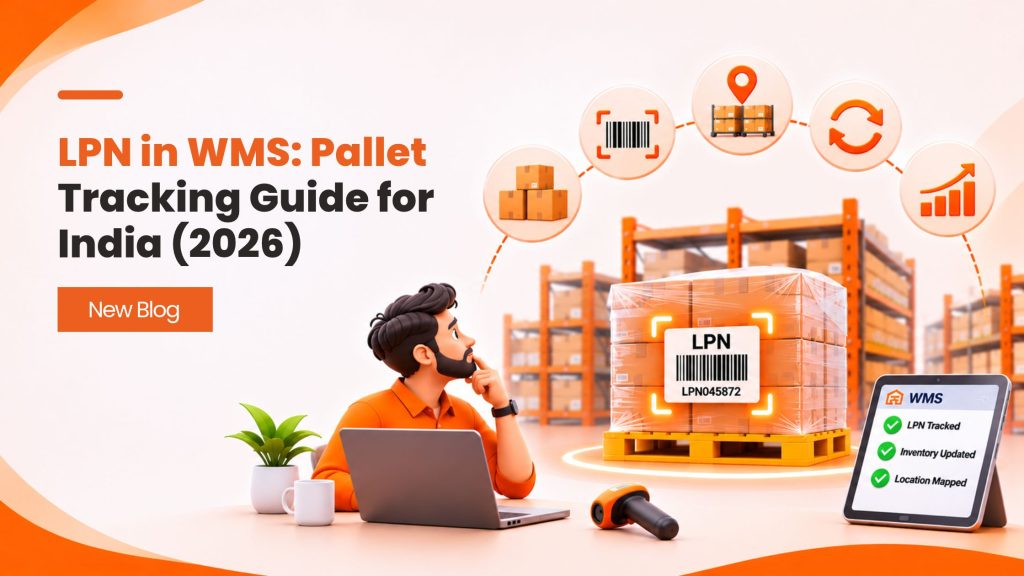
Now picture the same pallet with one barcode on it. One scan tells your system what is inside, which batch it belongs to and where it should be stored. That single barcode is a License Plate Number, or LPN.
Think of it like the number plate on a car. The traffic police don’t need to open your bonnet to know whose car it is. They read the plate. An LPN in WMS works the same way for pallets, cases and totes.
In this guide, you’ll learn:
- What an LPN is and how it differs from a SKU, batch number and SSCC
- How nested LPNs link pallets, cases and items
- How LPNs speed up receiving, putaway, picking, cross-docking and dispatch
- Whether barcode or RFID suits your pallet tracking budget
- How GS1 pallet labels fit Indian pharma, FMCG, 3PL and manufacturing operations
- The common mistakes teams make when they roll out LPNs
Let’s start with the basics.
What Is a License Plate Number (LPN) in a Warehouse?
A License Plate Number is a unique ID given to a handling unit in your warehouse. That unit can be a pallet, a carton, a tote or even a roll cage.
The LPN is printed as a barcode (or stored on an RFID tag) and stuck on the unit. Your warehouse management system then links that ID to everything inside it:
- SKUs and quantities
- Batch or lot numbers
- Manufacturing and expiry dates
- Current bin location
- Status, such as received, under QC, stored, picked or shipped
Here’s the key idea. You scan the container, not every item inside it. When the pallet moves from the dock to a rack, one scan updates the location of every unit on it.
Why LPNs matter for Indian warehouses
Many Indian warehouses are still moving from the old godown style to scan-based operations. Stock is often counted by hand, and location data lives in someone’s head.
That works at 200 orders a day. It breaks at 2,000.
LPNs help because they:
- Cut scan counts. One scan per pallet instead of one per carton.
- Reduce errors. The system knows the contents, so pickers don’t guess.
- Speed up audits. You count LPNs, not loose units.
- Support traceability. You can trace a batch back to the exact pallet and supplier.
- Help 3PL billing. Pallet counts per client come straight from the system.
In SAP, you’ll hear the same idea called a handling unit (HU). Oracle and most other WMS platforms simply call it an LPN. The name changes, but the concept stays the same.
LPN vs SKU vs Batch Number vs SSCC: What’s the Difference?
These four IDs often sit on the same pallet. That’s why people mix them up. Each one answers a different question.
| ID | What it identifies | Question it answers | Who creates it | Unique per unit? |
|---|---|---|---|---|
| SKU | A product type | “What product is this?” | Brand or seller | No, shared by every unit of that product |
| Batch / lot number | A production run | “When and where was it made?” | Manufacturer | No, shared by the batch |
| LPN | A container in your warehouse | “Which pallet or carton is this, and what’s in it?” | Your WMS (or a supplier label it accepts) | Yes |
| SSCC | A logistic unit across the supply chain | “Which shipment unit is this, globally?” | Shipper, using a GS1 company prefix | Yes, worldwide |
A simple way to remember it:
- SKU = the product
- Batch = the production run
- LPN = the box or pallet inside your building
- SSCC = the box or pallet as the whole supply chain sees it
Can an SSCC be used as an LPN?
Yes, and it’s often a smart move. If your supplier already ships pallets with a GS1 SSCC label, your WMS can accept that code as the LPN at receiving.
This saves you from printing a second label. It also keeps one ID on the pallet from the factory to the customer. We’ll cover SSCC labels in more detail later in this guide.
Nested LPNs: How Pallets, Cases and Items Link Together
Real pallets are rarely simple. One pallet may hold 40 cases, and each case may hold 24 bottles. So how does the system keep track of every level?
The answer is nesting. Each level gets its own LPN, and the WMS links them in a parent and child structure:
- Pallet LPN (parent): the full pallet
- Case LPN (child of the pallet): each carton on it
- Item or inner pack: units inside the case, tracked by SKU, batch or serial number
This is also called a packaging hierarchy. It works a bit like Russian dolls. Open the big one and you find smaller ones inside, each with its own identity.
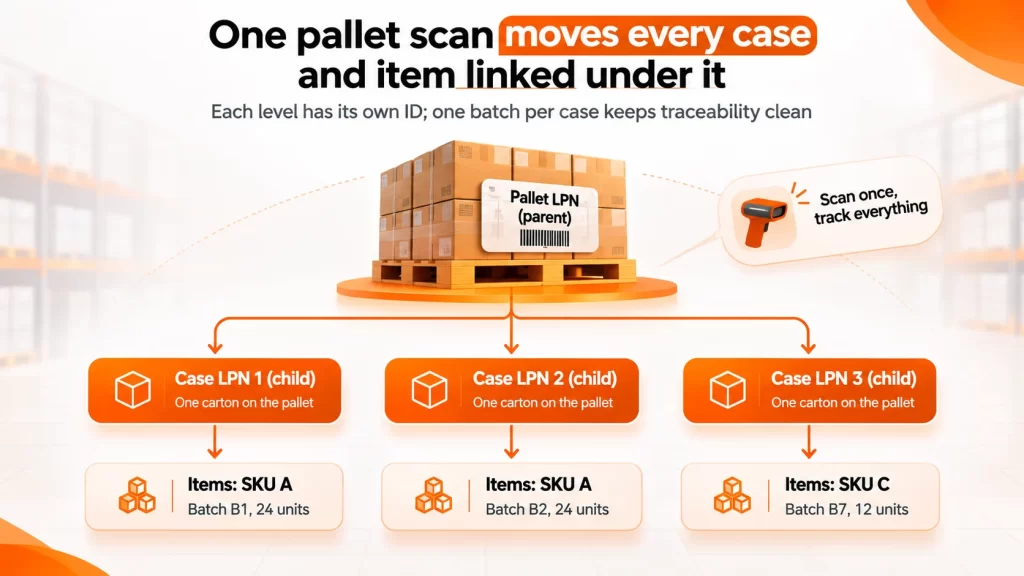
A mixed pallet like this one still moves as one unit, while each case keeps its own SKU and batch.
Why nesting is worth the effort
Nesting gives you the best of both worlds:
- Move the full pallet with one scan, and every case on it moves in the system too
- Break the pallet for picking, and each case keeps its own record
- Merge loose cases onto a new outbound pallet, and the system builds a new parent LPN
It’s especially useful for mixed pallets. Say a supplier sends one pallet with three SKUs from two batches. Without nesting, that pallet is a headache. With nesting, each case keeps its SKU and batch, while the pallet stays one unit for putaway.
A practical rule for mixed batches
Keep one batch per case LPN wherever you can. If a case holds two batches, any recall or expiry check becomes guesswork. The pallet can hold many batches, but each child LPN should stay clean.
How LPN in WMS Works: From Receiving to Dispatch
An LPN is born at the dock and retires when the goods leave. Let’s walk through each stage and see what changes.
1. Receiving: one scan instead of fifty
Receiving is where LPNs save the most time. Ideally, your supplier sends an ASN (Advance Shipping Notice) before the truck arrives. The ASN lists each pallet, its contents and its SSCC or LPN.
When the truck reaches the dock:
- The receiver scans the pallet label.
- The WMS matches it against the ASN and purchase order.
- Any shortage or excess shows up on screen immediately.
- The system posts the receipt and creates the goods received note (GRN).
No ASN? You can still generate LPNs at the dock. Print a label, stick it on the pallet and scan the cartons once to link them. It takes a few extra minutes, but you only do it once.
2. Quality check: hold the pallet, not the paperwork
Pharma, food and cosmetics warehouses often hold stock for inspection. With LPNs, you simply set the pallet’s status to “QC hold.”
The pallet can sit anywhere, and the system still blocks it from picking. Once QC passes, change the status and it becomes available stock.
3. Putaway: let the system choose the bin
After receiving, the WMS suggests a storage location based on your putaway rules. These can include SKU velocity, pallet size, weight or temperature zone.
The forklift driver then:
- Scans the pallet LPN
- Moves it to the suggested bin
- Scans the bin barcode to confirm
Two scans, and every case on that pallet now has a correct location. Compare that with updating 40 cartons by hand.
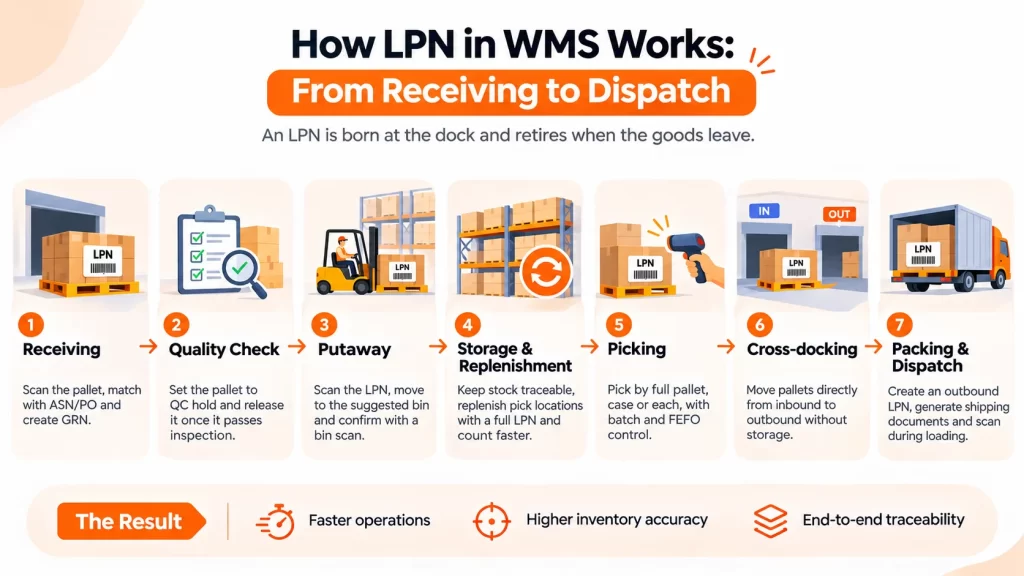
4. Storage, replenishment and counting
While stock sits in reserve racks, the LPN keeps it findable. When a pick face runs low, the system can trigger a full-LPN replenishment: move one complete pallet from reserve to the pick location.
Audits get easier too. During cycle counting, counters scan sealed pallet LPNs and only open the ones that look wrong. That cuts counting time without hurting inventory accuracy.
5. Picking: full LPN, case or each
LPNs give you three picking options:
- Full-LPN pick: The order quantity matches a full pallet, so the whole pallet ships. This is common in B2B and distributor orders.
- Case pick: The picker scans a case LPN and takes complete cartons.
- Each pick: The picker breaks a case and picks loose units, usually for D2C orders.
In all three, the scan confirms the right item and batch. This is how FEFO rules actually get followed on the floor.
6. Cross-docking: in and out without storage
In cross-docking, pallets go from the inbound dock to the outbound dock with little or no storage. LPNs make this possible at speed.
The WMS reads the pallet LPN, sees that it’s already allocated to an outbound order and sends it straight to the right dispatch lane. No putaway, no second scan of contents.
7. Packing and dispatch: build the outbound LPN
At packing, picked cartons are consolidated onto an outbound pallet. The WMS creates a new outbound LPN and links every carton to it.
This outbound LPN then feeds your dispatch paperwork:
- Packing list and shipping label
- Invoice and e-way bill details, such as quantity, value and HSN
- Loading manifest for the truck
At the loading bay, the team scans each outbound LPN as it goes on the vehicle. If a pallet is missing or loaded on the wrong truck, the system flags it before the doors close.
Barcode vs RFID for Pallet Tracking: Which One Fits?
An LPN is just a number. You still need a way to read it. Most warehouses choose between barcode labels and RFID tags.
| Factor | Barcode LPN labels | RFID pallet tags |
|---|---|---|
| Upfront cost | Low: a thermal printer, labels and handheld scanners | Higher: tags, readers, antennas and setup |
| How it’s read | Line of sight, one label at a time | No line of sight, many tags at once |
| Speed at the dock | Fast enough for most operations | Very fast, a whole truckload can be read through a portal |
| Durability | Labels can tear, fade or get wrapped over | Tags survive rough handling better |
| Best for | SMEs, 3PLs, D2C and most FMCG warehouses | High-volume DCs, returnable pallets, high-value goods |
Start with barcodes, add RFID where it pays
For most Indian warehouses, barcode LPNs are the right first step. They are cheap, simple to train on and work with the RF scanners you may already own.
RFID makes sense when the volume justifies it. Think of a dock that receives hundreds of pallets a day, or a pooled pallet network where you need to track the pallets themselves.
Many teams run a hybrid. Barcodes go on every LPN, and RFID goes only on high-value or returnable assets. For a cost breakdown, read our guide on barcode vs RFID warehouse management cost.
What about GPS and IoT pallet trackers?
GPS trackers report a pallet’s location while it’s on the road, and some also log temperature or shocks. They are useful for cold chain and high-value shipments.
Inside the warehouse, though, GPS adds little. Your WMS already knows the bin. Treat GPS as a transport tool that connects to your WMS, not a replacement for LPNs.
SSCC and GS1 Pallet Labels in India
If you supply to large retailers, export goods or work in pharma, you’ll hear about SSCC labels. SSCC stands for Serial Shipping Container Code. It’s an 18-digit number from GS1 that identifies one logistic unit, such as a pallet, anywhere in the world.
The SSCC is printed on a GS1-128 barcode, along with optional details like GTIN, batch number and best-before date. GS1 India explains the GS1-128 structure here.
What goes on a pallet label?
A typical GS1 logistics label has three parts:
- Top: free text, such as sender and receiver names
- Middle: human-readable content details, like product, quantity and batch
- Bottom: barcodes, with the SSCC always in the lowest barcode
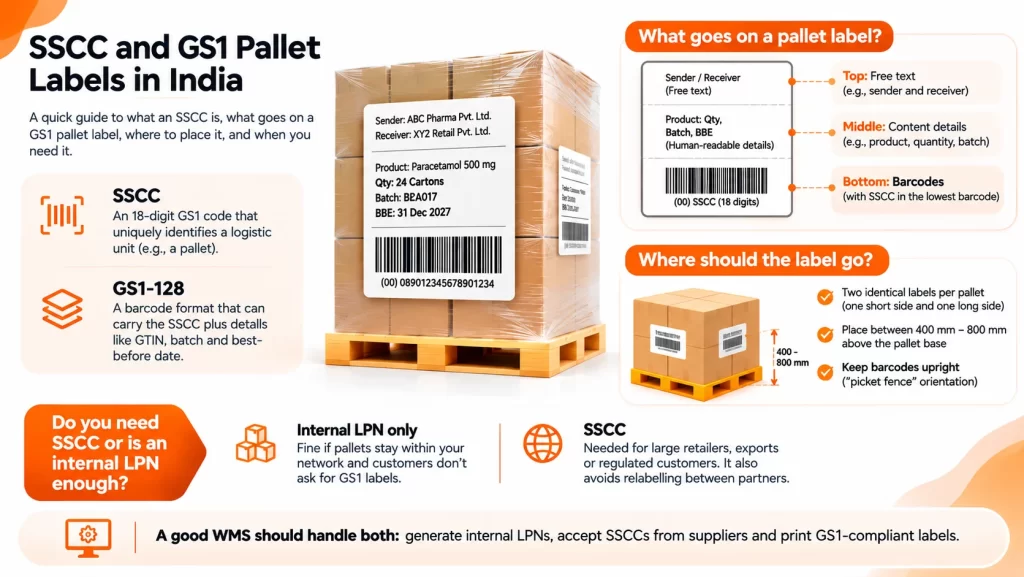
Where should the label go?
Placement matters more than people think. A label hidden under stretch wrap is a label nobody can scan.
GS1 UK’s pallet label guidance recommends:
- Two identical labels per pallet, one on a short side and one on a long side
- Labels placed between 400 mm and 800 mm above the pallet base
- Barcodes in an upright, “picket fence” orientation
Do you need SSCC, or is an internal LPN enough?
It depends on who reads your labels.
- Internal LPN only: fine if pallets never leave your network, or your customers don’t ask for GS1 labels.
- SSCC: needed when large retailers, export buyers or regulated customers ask for it. It also removes relabelling between partners.
Your WMS should handle both. It should generate internal LPNs, accept SSCCs from suppliers and print SSCC labels for outbound pallets when a customer needs them.
Pallet Tracking Use Cases Across Indian Industries
LPNs work everywhere, but each industry leans on them for a different reason.
Pharma: batch control and export traceability
Pharma warehouses live and die by batch and expiry control. Nested LPNs let you trace a strip back to its shipper carton, pallet and supplier in seconds.
The rules have shifted recently. India withdrew the DGFT export track and trace system from 1 February 2025. The domestic QR code rule for top drug brands does not require pallet-level aggregation.
Even so, many manufacturers still use SSCC labels on shipper cartons and pallets. Export buyers expect them, and they make recalls far easier. Always confirm the current rules for your products with your regulatory team.
FMCG and food: FEFO on every pick
FMCG goods move fast and expire fast. When each pallet LPN carries a batch and expiry date, the WMS can force FEFO (First Expiry, First Out) picking.
The picker scans the LPN, and the system blocks the pick if an older batch is still in stock. Our guide to batch and expiry tracking in FMCG covers this in more depth.
3PL: client separation and pallet billing
A 3PL may store goods for 20 brands under one roof. LPNs keep each client’s stock separate, even in shared racks.
They also settle billing arguments. Storage charges are often billed per pallet per day. When every pallet has an LPN with a receipt date, the invoice comes straight from system data. Learn more in our 3PL warehouse management guide.
Manufacturing: from line end to dispatch
In a factory, finished goods are palletised at the end of the line. The WMS creates the pallet LPN right there, before the pallet even reaches the warehouse.
This links production batches to dispatches. If a customer reports a defect, you can see every pallet from that shift and where each one went.
Automotive spares and electronics: mixed cartons
Spare parts and electronics often ship in mixed cartons with dozens of small SKUs. Case-level LPNs stop pickers from opening the wrong box. Serial numbers stay linked to the carton for warranty claims.
7 Common LPN Mistakes (and How to Avoid Them)
LPNs are simple in theory. In practice, a few small slips can undo the benefits. Watch out for these.
- Not defining what an LPN means. Is it a pallet, a case or a tote? Decide upfront and write it into your SOP. Mixed definitions create mixed data.
- Assigning LPNs too late. If labels go on after putaway, you’ve already lost the speed gain. Assign the LPN at the first scan on the dock.
- Mixing batches inside one case LPN. This breaks FEFO and makes recalls painful. Keep one batch per child LPN.
- Reusing LPN numbers. A recycled number can point to old history. Retire every LPN once it’s empty, and never issue the same number twice.
- Poor label placement. Labels under stretch wrap, on the base or facing the wall slow everyone down. Follow GS1 placement rules and train the team.
- Breaking a pallet without updating the system. When someone takes two cases off a pallet by hand, the LPN contents go wrong. Make “scan before you move” a floor rule.
- Ignoring the supplier’s SSCC. If the pallet already arrives with a valid SSCC, don’t print a second label. Accept it as the LPN and save time.
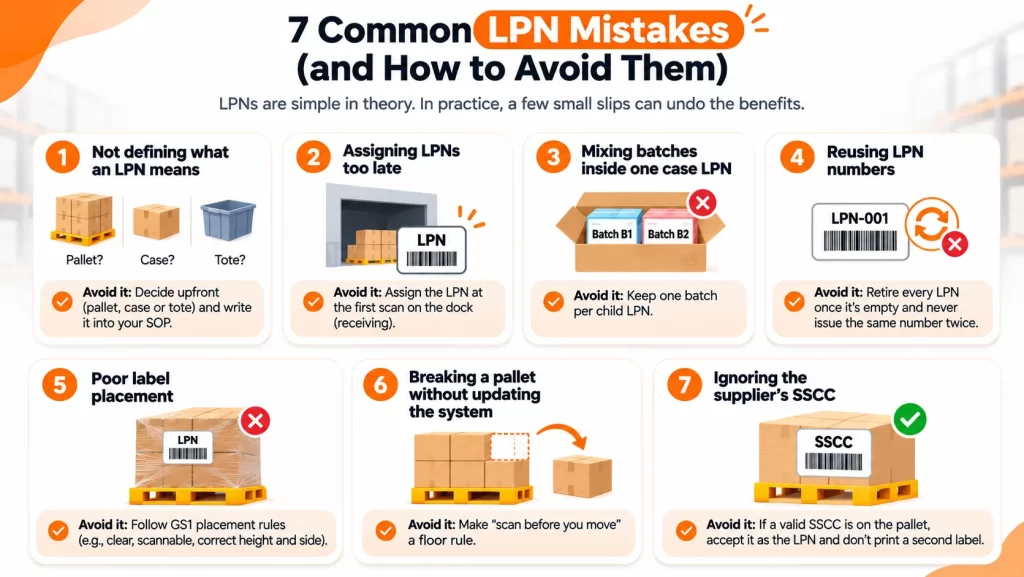
Most of these are process issues, not software issues. A good WMS helps, but clear SOPs and floor discipline make LPNs stick.
Conclusion: Track the Container, Trust the Count
Let’s go back to that 6 pm truck. With LPNs in place, the receiver scans 1 pallet label instead of 48 cartons. The system suggests a bin, the forklift moves the pallet and the truck leaves on time.
Here’s what to remember:
- An LPN is a unique ID for a pallet, case or tote, and it lets you scan the container instead of every item.
- Nested LPNs link pallets, cases and items, so you can move in bulk and still trace every unit.
- LPNs speed up every stage, from receiving and putaway to picking, cross-docking and dispatch.
- Barcodes are the practical starting point. Add RFID where volume or asset value justifies it.
- SSCC labels matter when customers, export buyers or regulators ask for GS1 compliance.
- Most LPN failures come from process gaps, not technology.
Is your team still counting cartons by hand or hunting for pallets in the racks? Then it’s time to make LPNs part of your daily workflow.
Omneelab WMS supports LPN-based receiving, nested pallet and case tracking, batch and expiry control and scan-based dispatch, built for Indian warehouses and 3PLs. Book a free demo to see pallet tracking in action on your own SKUs.
Frequently Asked Questions
LPN stands for License Plate Number. It’s a unique barcode or RFID ID given to a pallet, case, tote or carton. The WMS links it to the SKUs, quantities, batches and location of everything inside.
An LPN is usually an internal ID that your WMS creates for use inside your warehouse. An SSCC is an 18-digit GS1 standard code that identifies a logistic unit across the whole supply chain. Your WMS can accept a supplier’s SSCC as the LPN, so one pallet carries one ID end to end.
Yes. A pallet LPN can hold many SKUs and batches through nesting, with each case getting its own child LPN. For clean traceability and FEFO, keep one batch per case-level LPN.
Use barcode LPN labels and handheld RF scanners. Scan the pallet at receiving, putaway, every move, picking and loading. Each scan updates the pallet’s location and status in the WMS, which gives you real-time pallet tracking at a low cost.
They’re very close. SAP EWM uses the term handling unit (HU) for a packed unit with its own ID, which is the same idea as an LPN in other WMS platforms. Both support nesting, so a pallet HU can hold several carton HUs.

Kapil Pathak is a Senior Digital Marketing Executive with over six years of experience specializing in the logistics and supply chain industry. His expertise spans digital strategy, search engine optimization (SEO), search engine marketing (SEM), and multi-channel campaign management. He has a proven track record of developing initiatives that increase brand visibility, generate qualified leads, and drive growth for D2C & B2B technology companies.