Picture this. It’s the middle of the second shift at an auto components plant in Pune. The assembly line is running well, and then an operator reaches into a bin for M8 bolts and finds it empty.
Nobody saw it coming. The kanban card that should have gone back to the store fell behind a pallet two days ago. The line stops, the supervisor starts making calls, and a material handler runs to the warehouse.
A 15-minute stoppage like that can cost more than the bolts themselves are worth for a whole month.
This is the problem kanban replenishment in manufacturing is meant to solve. The idea is simple: use what you need, then signal for more. But on a busy Indian shop floor, the manual version often breaks in small ways that add up.
In this guide, you’ll learn:
- What a kanban replenishment system is and how it works
- The three types of kanban, and how two-bin systems fit in
- How to calculate the number of kanbans you need, with a worked example
- Where manual kanban tends to break down
- How a WMS runs e-kanban to automate line-side supply
Let’s start with the basics.
What Is a Kanban Replenishment System?
A kanban replenishment system is a pull-based method for restocking materials. Stock is refilled only when it gets used, not according to a forecast.
The word kanban is Japanese for “signboard” or “card.” The method came out of the Toyota Production System, where Toyota used cards to control how parts moved between processes. Each card represented a fixed quantity of a part. When a container was emptied, its card went back upstream as a request to refill it.
Here’s a simple analogy. Think of the milk in your fridge. You don’t buy milk every day just in case. You buy more when you open the last packet. The empty packet is your signal. Kanban works the same way, just with more discipline.
Kanban Is a Pull System, Not a Push System
People often ask whether kanban is push or pull. It’s pull.
- Push systems (like traditional MRP) plan production and purchases from forecasts, then push material toward the line.
- Pull systems (like kanban) wait for actual consumption, then pull material forward to replace what was used.
Most plants run a mix of both. MRP handles long-lead items and supplier planning. Kanban handles fast-moving, repetitive parts at the point of use.
If you want the bigger picture on consumption-led stocking, our guide to demand-driven replenishment explains how pull-based replenishment fits into a wider supply plan.
Why Kanban Matters for Line-Side Supply
Line side replenishment means keeping the right parts at the right workstation, in the right quantity, at the right time. It’s where kanban does its best work.
Why? Because space at the line is limited. You can’t store a week of stock next to every station. At the same time, you can’t afford a stockout that stops the whole line.
Kanban holds that balance. It keeps small, fixed quantities at the point of use (POU) and refills them quickly and predictably from a nearby store or “supermarket.” For a deeper look at stocking the line itself, read our post on line-side inventory management with a WMS.
How Does a Kanban Replenishment System Work?
At its core, every kanban setup runs on a kanban loop. Here’s how one cycle works:
- Consumption: An operator uses parts from a container at the workstation.
- Signal: When the container is empty (or hits a set level), a replenishment trigger goes off. This could be a card, an empty bin, or a barcode scan.
- Pick: The signal reaches the store or supermarket. A worker picks the fixed container quantity.
- Delivery: A material handler brings the full container back to the line, usually on a scheduled route.
- Reset: The card or signal goes back with the full container, and the loop starts again.
That’s it. No complex planning. Just a steady, visible cycle.
The Role of the Supermarket
In lean manufacturing, a supermarket is a small, controlled store close to the production area. It holds parts in standard containers, ready to be picked.
The supermarket sits between the main warehouse and the shop floor. The warehouse refills the supermarket, and the supermarket feeds the line. This two-step setup keeps line-side stock lean while protecting against long travel times.
Milk Runs and the Water Spider
How does material actually reach the line? In most well-run plants, the answer is a milk run.
A milk run is a fixed delivery route that a material handler follows at set intervals. On each round, the handler:
- Drops off full containers at each station
- Picks up empty containers and kanban cards
- Takes the signals back to the supermarket
The person doing this job is often called a water spider. In larger plants, milk runs use a tugger train that pulls several carts along a planned path.
Milk runs and kanban work together. Kanban tells you what to deliver. The milk run decides when and how. Our in-plant logistics software guide covers milk run planning and material handler routes in more detail.
The Three Types of Kanban (Plus the Two-Bin System)
Not every kanban signal means the same thing. There are three main types, and each controls a different flow.
1. Withdrawal Kanban (Move Kanban)
A withdrawal kanban, also called a move kanban, authorizes moving parts from one location to another. For example, it moves parts from the supermarket to the assembly line.
It doesn’t ask anyone to make anything. It only says, “Move this quantity from here to there.” This is the most common type in line side replenishment.
2. Production Kanban
A production kanban tells an upstream process to make more of something. When a container of machined parts is used, the production kanban goes back to the machining cell as a work order.
This keeps WIP inventory under control. Each process makes only what the next process has actually used.
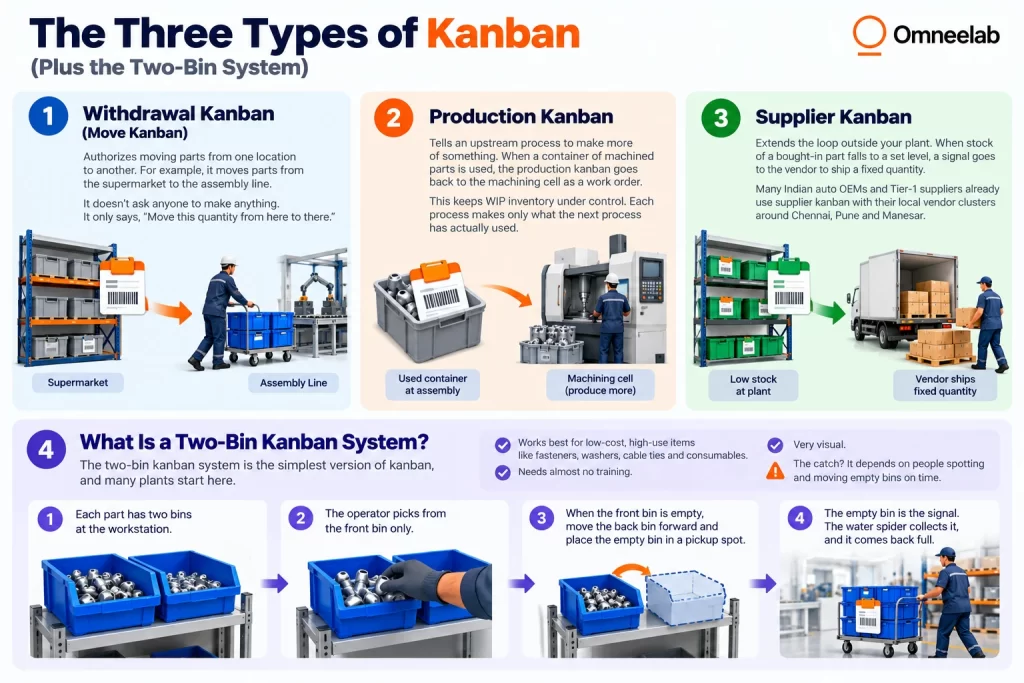
3. Supplier Kanban
A supplier kanban extends the loop outside your plant. When stock of a bought-in part falls to a set level, a signal goes to the vendor to ship a fixed quantity.
Many Indian auto OEMs and Tier-1 suppliers already use supplier kanban with their local vendor clusters around Chennai, Pune and Manesar.
For a wider look at trigger types beyond kanban, see our guide on types of inventory replenishment.
What Is a Two-Bin Kanban System?
The two-bin kanban system is the simplest version of kanban, and many plants start here.
Here’s how it works:
- Each part has two bins at the workstation.
- The operator picks from the front bin only.
- When the front bin is empty, the operator moves the back bin forward and places the empty bin in a pickup spot.
- The empty bin is the signal. The water spider collects it, and it comes back full.
The two-bin system works best for low-cost, high-use items like fasteners, washers, cable ties and consumables. It needs almost no training, and it’s very visual.
The catch? It depends on people spotting and moving empty bins on time. More on that shortly.
How to Calculate the Number of Kanbans
This is where many teams struggle. Too few kanbans and the line starves. Too many and you’re back to piles of excess stock at the line.
The standard kanban formula is:
Number of kanbans (N) = (D × L × (1 + S)) ÷ C
Where:
- D = average demand per period (e.g., units per day)
- L = replenishment lead time, in the same period unit
- S = safety factor (as a decimal, e.g., 0.2 for 20%)
- C = container quantity (units per bin or card)
A Worked Example
Let’s say you run a two-wheeler assembly line. You want to size kanbans for a brake lever bracket.
- Daily demand (D): 1,200 units
- Lead time to refill from the supermarket (L): 0.5 day (half a shift cycle, including pick and milk run)
- Safety factor (S): 20%, or 0.2
- Container quantity (C): 50 units per bin
Now plug it in:
N = (1,200 × 0.5 × 1.2) ÷ 50
N = 720 ÷ 50
N = 14.4, rounded up to 15 kanbans
So you’d run 15 containers of 50 brackets each in this loop.
Getting the Inputs Right
The formula is simple. The inputs are where mistakes creep in.
- Demand should reflect your actual production schedule, not last quarter’s average.
- Lead time must include everything: signal delay, picking, the wait for the next milk run and travel.
- Safety stock should cover real variation, not guesswork.
If you’d like to dig into buffer sizing, our guides to safety stock calculation and the reorder point formula use the same logic.
One more tip: review kanban sizes regularly. Demand in 2026 moves fast, especially for plants supplying EV, electronics and FMCG lines. A kanban count that was right in January may be wrong by June.
Kanban vs MRP vs JIT: What’s the Difference?
These three terms get mixed up a lot. Here’s a quick comparison:
| Kanban | MRP | JIT | |
|---|---|---|---|
| What it is | A signaling tool | A planning system | A philosophy |
| Logic | Pull (based on use) | Push (based on forecast) | Pull (make only what’s needed) |
| Best for | Repetitive, fast-moving parts | Long lead times, complex BOMs | The whole production system |
| Driven by | Actual consumption | Master production schedule | Waste reduction |
In short, JIT is the goal, kanban is one of the main tools used to reach it, and MRP handles the planning that kanban can’t. Most successful plants use MRP for the big picture and kanban on the shop floor.
Where Manual Kanban Breaks Down
Kanban is simple in theory. So why do so many plants struggle to keep it running?
Because manual kanban depends on paper, people and perfect habits. On a real shop floor, all three slip. Here are the most common failure points.
Lost or Delayed Kanban Cards
This is the classic problem. A card falls behind a rack, stays in someone’s pocket, or gets mixed up with scrap. The signal never reaches the supermarket.
The result? A line side stockout that nobody saw coming.
No Real-Time Visibility
With card kanban, you can’t see the whole picture. How many containers are empty right now? Which parts are close to running out? Is the milk run on time?
Supervisors usually find out only when an operator raises a flag. By then, it’s too late.
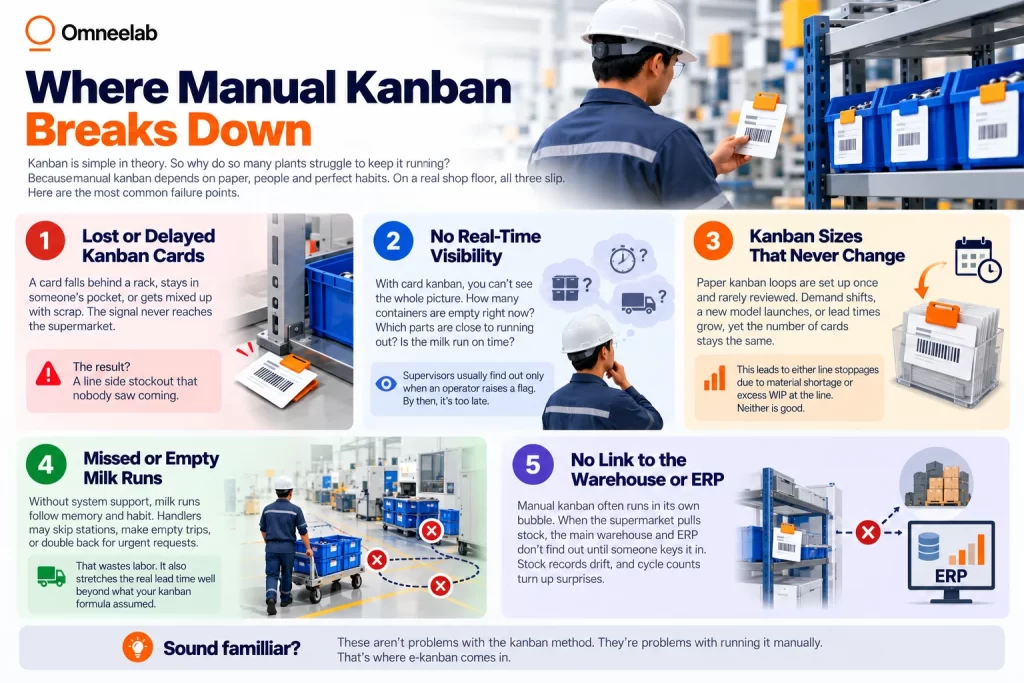
Kanban Sizes That Never Change
Paper kanban loops are set up once and rarely reviewed. Demand shifts, a new model launches, or lead times grow, yet the number of cards stays the same.
This leads to either line stoppages due to material shortage or excess WIP at the line. Neither is good.
Missed or Empty Milk Runs
Without system support, milk runs follow memory and habit. Handlers may skip stations, make empty trips, or double back for urgent requests.
That wastes labor. It also stretches the real lead time well beyond what your kanban formula assumed.
No Link to the Warehouse or ERP
Manual kanban often runs in its own bubble. When the supermarket pulls stock, the main warehouse and ERP don’t find out until someone keys it in. Stock records drift, and cycle counts turn up surprises.
Sound familiar? These aren’t problems with the kanban method. They’re problems with running it manually. That’s where e-kanban comes in.
What Is E-Kanban (Electronic Kanban)?
An e-kanban system replaces physical cards with digital signals. Instead of carrying a card back to the store, an operator scans a barcode, taps a screen, or lets a sensor do the job.
The logic stays exactly the same. You still have fixed containers, fixed quantities and a pull-based loop. Only the signal changes.
Card Kanban vs E-Kanban
| Card kanban | E-kanban | |
|---|---|---|
| Signal | Physical card or empty bin | Barcode scan, RFID read or sensor |
| Speed | Depends on the next pickup | Instant |
| Visibility | Local only | Plant-wide, real time |
| Lost signals | Common | Rare |
| Resizing | Manual reprint | Update in the system |
| Data for improvement | Little or none | Full history |
E-kanban also works across sites. That makes it useful for supplier kanban with vendors spread across an industrial cluster.
How a WMS Automates Line-Side Supply with E-Kanban
Now for the part that matters most for your operations. How does a WMS kanban integration actually work day to day?
A modern WMS connects the shop floor, the supermarket and the main warehouse in one flow. Here’s what that looks like step by step.
Step 1: Digital Kanban Setup
In the WMS, each kanban loop is defined once:
- Part number and container quantity
- Source location (supermarket or warehouse bin)
- Destination (line, station or POU rack)
- Number of kanbans in the loop
Every container gets a barcode or RFID tag linked to this setup.
Step 2: Instant Replenishment Triggers
When a container empties, the operator scans its label with a handheld or fixed scanner. That’s the trigger.
In more advanced setups, RFID or IoT smart bins trigger it automatically. Weight sensors spot when a bin is light, and RFID gates read empty containers as they pass. Our explainer on RFID technology and how it works covers the hardware side.
Step 3: Automatic Pick Tasks
As soon as the signal lands, the WMS creates a pick task at the supermarket. The picker sees exactly what to pick, from which bin, and for which station.
There’s no card sorting and no guesswork. The task is prioritized by how close the line is to running out.
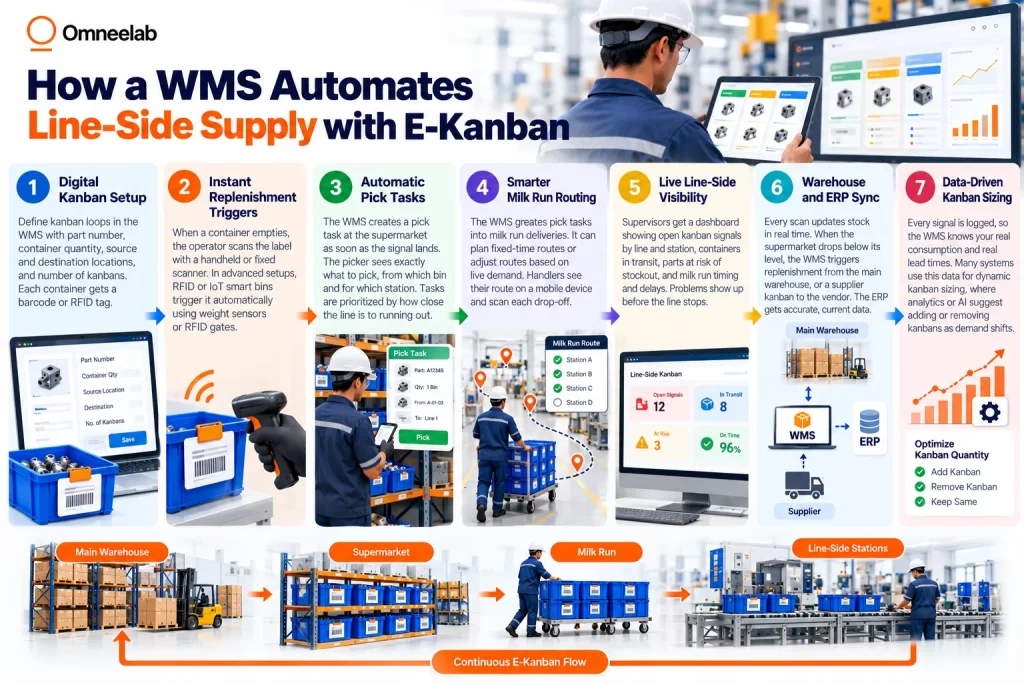
Step 4: Smarter Milk Run Routing
The WMS groups pick tasks into milk run deliveries. It can plan fixed-time routes, or it can adjust routes based on live demand.
Material handlers see their route on a mobile device. They scan each drop-off, so the system knows the container reached the line.
Step 5: Live Line-Side Visibility
Supervisors get a dashboard showing:
- Open kanban signals by line and station
- Containers in transit
- Parts at risk of stockout
- Milk run timing and delays
Problems show up before the line stops, not after.
Step 6: Warehouse and ERP Sync
Every scan updates stock in real time. When the supermarket drops below its own level, the WMS triggers replenishment from the main warehouse, or a supplier kanban to the vendor.
The ERP gets accurate, current data. Your stock records finally match what’s on the floor.
Step 7: Data-Driven Kanban Sizing
This is the benefit most plants miss. Because every signal is logged, the WMS knows your real consumption and real lead times.
In 2026, many systems use this data for dynamic kanban sizing, where analytics or AI suggest adding or removing kanbans as demand shifts. It’s a practical Industry 4.0 step that doesn’t need a full smart factory rebuild.
If you’re weighing whether in-plant flows belong in your WMS or a separate tool, read our comparison of in-plant logistics vs warehouse management.
What Results Can You Expect?
Every plant is different, but moving from manual kanban to WMS-driven e-kanban usually brings gains in these areas:
- Fewer line stoppages, because signals don’t get lost
- Lower WIP and line-side stock, since kanban sizes follow real demand
- Better labor use, as milk runs stop making empty or duplicate trips
- Higher inventory accuracy, because every movement is scanned
- Faster problem-solving, with full data on every loop
We’ve seen this firsthand. Read how a leading heavy manufacturing company improved inventory accuracy with Omneelab’s WMS.
Getting Started: A Practical Rollout Plan
You don’t need to digitize every part on day one. Here’s a phased approach that works well for Indian plants:
- Pick a pilot line. Choose one line with steady demand and frequent shortages.
- Classify your parts. Use ABC analysis to decide which parts suit kanban. High-volume, low-cost items are the best place to start.
- Size your loops. Apply the kanban formula with real lead times, not estimates.
- Label everything. Put barcodes on every container and location.
- Train operators and water spiders. Keep scanning simple: one scan per empty bin.
- Run parallel for two weeks. Keep physical cards as a backup while the system beds in.
- Review and scale. Check stockouts, WIP and milk run efficiency, then roll out line by line.
For deeper guidance, the Lean Enterprise Institute’s kanban definition is a solid reference for teams that are new to lean terms.
Conclusion: Keep the Line Moving, Without the Guesswork
Kanban has lasted for decades for a good reason. It’s simple, visual, and built on actual consumption rather than forecasts.
To recap:
- A kanban replenishment system uses pull signals to refill parts only when they’re used.
- Withdrawal, production and supplier kanbans control different flows, and two-bin systems are the easiest starting point.
- The kanban formula (D × L × (1 + S) ÷ C) helps you size loops, as long as your inputs are accurate.
- Manual kanban breaks through lost cards, poor visibility and fixed sizing.
- E-kanban in a WMS fixes those gaps with instant triggers, automatic pick tasks, smarter milk runs and live dashboards.
If your plant still runs on paper cards and phone calls, you’re leaving uptime on the table.
Ready to automate line-side supply? Book a demo with Omneelab to see how our WMS runs e-kanban, milk runs and supermarket replenishment in one connected system, built for Indian manufacturing.
Frequently Asked Questions
Kanban replenishment is a pull-based method where parts are restocked only after they’re used. An empty container, card or digital scan acts as the replenishment trigger. This keeps just-in-time inventory at the line and avoids overstocking.
MRP is a push system that plans material from forecasts and the production schedule. Kanban is a pull system that responds to actual consumption on the shop floor. Most plants use MRP for long-term planning and kanban for day-to-day line side replenishment.
Use the formula N = (D × L × (1 + S)) ÷ C. D is demand, L is lead time, S is the safety factor, and C is container quantity. Always round up, and review the result as demand or lead times change.
Card kanban uses physical cards or empty bins as signals. E-kanban uses barcode scans, RFID or sensors to send signals instantly. E-kanban adds real-time visibility, removes lost cards and makes kanban sizes easier to update.
Yes. A modern WMS can manage e-kanban loops, create pick tasks from supermarket stock, plan milk run routes and sync with your ERP. It connects the shop floor, the supermarket and the warehouse in one real-time flow.

Kapil Pathak is a Senior Digital Marketing Executive with over six years of experience specializing in the logistics and supply chain industry. His expertise spans digital strategy, search engine optimization (SEO), search engine marketing (SEM), and multi-channel campaign management. He has a proven track record of developing initiatives that increase brand visibility, generate qualified leads, and drive growth for D2C & B2B technology companies.