Picture a mechanic halfway through a brake job, reaching for a socket wrench that isn’t in the tray. That’s what happens on a production line every time an operator runs out of a part mid-cycle. The line stalls. The clock keeps ticking. And somewhere in the plant, a supervisor is asking why nobody saw it coming.
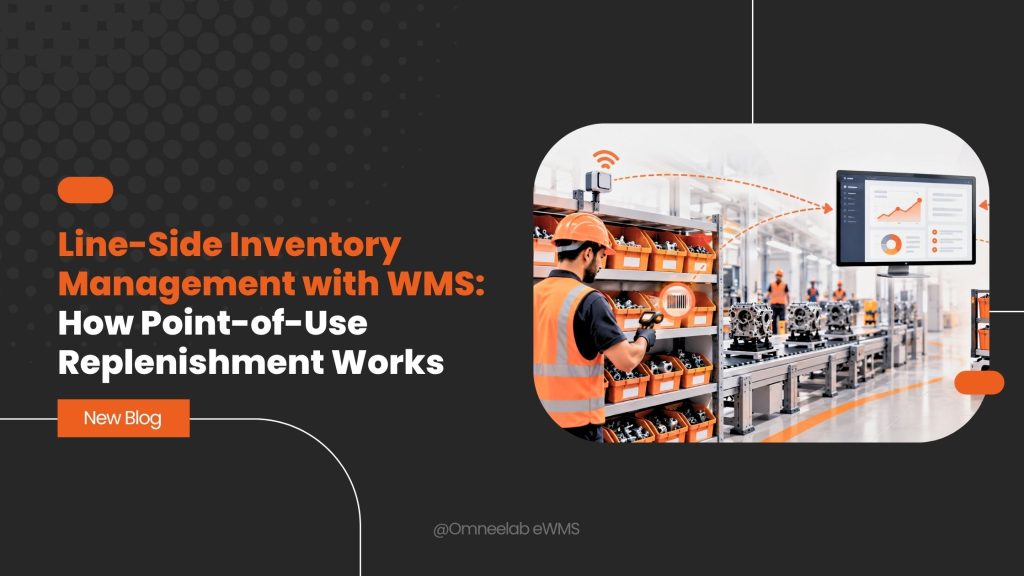
This is exactly the problem that line-side inventory management solves. And when you pair it with a warehouse management system, or WMS, you get something even better: parts that show up right where and when they’re needed, without anyone having to chase them down.
In this guide, we’ll break down what line-side inventory management actually means, how point-of-use replenishment works in practice, and which methods (kanban, two-bin, min-max, JIT, JIS) keep the whole system humming. By the end, you’ll understand exactly how a WMS turns a chaotic supply chain into a quiet, predictable one.
What Is Line-Side Inventory Management?
Line-side inventory management is the practice of storing and controlling the parts, components, and materials that sit directly at or near a production line. Instead of workers walking to a stockroom every time they need a bolt or a bracket, the inventory lives right where it’s used.
Think of it like a chef’s mise en place. Everything the cook needs for the next ten dishes is already chopped, measured, and within arm’s reach. Nobody’s rummaging through the walk-in fridge mid-service.
On a factory floor, that “arm’s reach” storage might look like:
- Flow racks positioned next to a workstation
- Bins mounted on a cart beside the assembly point
- Small shelving units holding a day’s worth of fasteners
The goal is simple. Keep enough stock at the line to avoid stoppages, but not so much that you’re drowning in excess inventory and wasted floor space. Getting that buffer right comes down to knowing your buffer stock levels and how to calculate them for each part.
That balancing act is harder than it sounds, which is exactly why most manufacturers lean on a warehouse management system to handle it.
What Is Point-of-Use Replenishment?
Point-of-use replenishment, often shortened to POU replenishment, is the process of restocking that line-side inventory based on actual consumption. As an operator uses a part, a signal goes out. That signal triggers a restock before the bin runs dry.
It’s a reactive system in the best sense of the word. Rather than guessing how much inventory to stage weeks in advance, point-of-use replenishment responds to what’s really happening on the floor right now.
Some companies even brand their own version of this. Avnet, for example, calls its system POURS, short for Point of Use Replenishment System, and uses barcode scans as the replenishment trigger.
The core idea stays consistent across every version, though: consumption drives supply, not the other way around.
How a WMS Powers Point-of-Use Replenishment
Here’s where things get interesting. A warehouse management system is the engine that makes point-of-use replenishment actually work at scale.
Without software tying everything together, you’re stuck relying on someone physically checking bins and calling in orders. That works fine for a five-person shop. It falls apart fast in a facility running multiple shifts and thousands of SKUs.
Real-Time Demand Signals
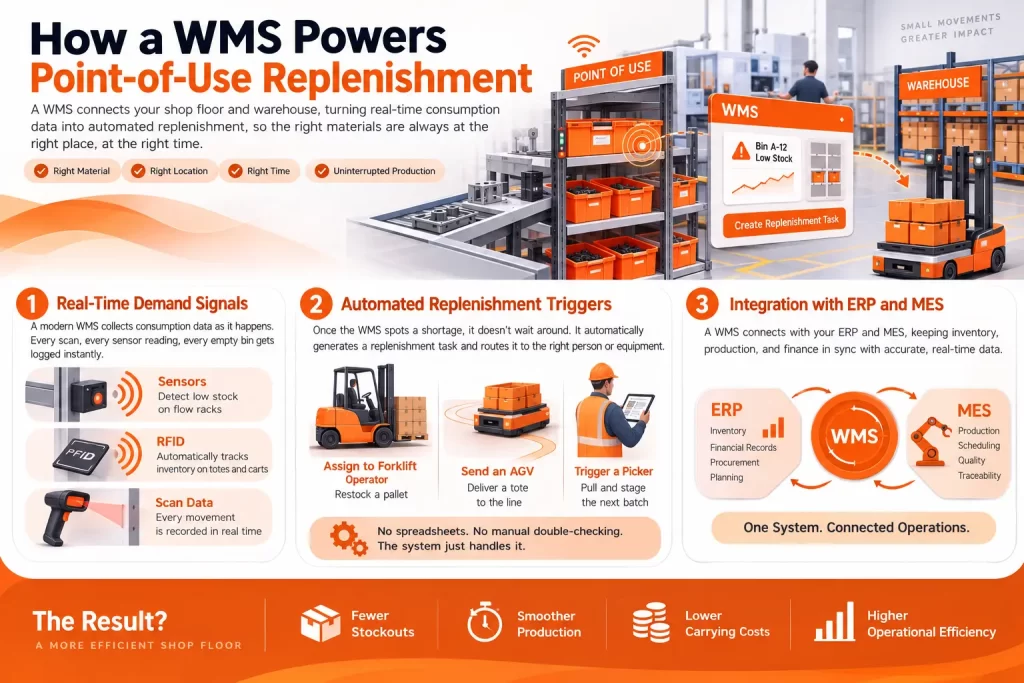
A modern WMS collects consumption data as it happens. Every scan, every sensor reading, every empty bin gets logged instantly.
Photoelectric sensors on flow racks can detect when stock drops past a set threshold. RFID inventory tracking tags on totes and carts identify inventory automatically as it moves through the plant. The WMS receives all of this and knows, in real time, what’s running low and where.
Automated Replenishment Triggers
Once the WMS spots a shortage, it doesn’t wait around. It automatically generates a replenishment task and routes it to the right person or piece of equipment.
This might mean:
- Dispatching a forklift operator to restock a pallet
- Sending an automated guided vehicle (AGV) to deliver a tote
- Triggering a picker in the warehouse to pull and stage the next batch
No spreadsheets. No manual double-checking. The system just handles it.
Integration with ERP and MES
A WMS rarely works alone. It typically connects to your enterprise resource planning (ERP) system and, in many plants, a manufacturing execution system (MES) as well.
That integration matters. It means inventory movements at the line reflect back into financial and production records automatically, so your accounting and your shop floor are always looking at the same numbers. If you’re planning a rollout, our breakdown of WMS and ERP integration covers the common pitfalls to avoid.
Line-Side Delivery vs Point-of-Use Replenishment vs Kitting
These three terms get tossed around interchangeably, but they’re not quite the same thing. Understanding the difference helps you pick the right approach for your operation.
Line-side delivery is the physical act of moving parts from the warehouse to the production line. It’s the transportation piece.
Line-side stocking (sometimes just called point-of-use storage) is the racking and presentation system at the line itself, where parts sit ready for an operator to grab.
Kitting is a different animal altogether. Instead of stocking individual components at the line, workers upstream pre-assemble everything needed for one build into a single kit or container. The operator gets one tidy package instead of five separate bins to dig through. For a closer look at how this works in practice, see our guide on what kitting actually involves.
So which one wins? Honestly, it depends on your production style.
High-volume, low-variety lines usually do fine with straightforward line-side stocking. It’s simpler to manage and doesn’t require an extra kitting step. But if you’re running high-mix, low-volume production, with lots of product variants and configurations, kitting tends to reduce errors because operators aren’t hunting through multiple SKUs at once.
Many plants actually use both. Common parts get stocked line-side, while variant-specific or sequenced parts arrive as kits.
Common Replenishment Methods Used at the Line
Once you’ve decided how parts get presented at the line, you still need a method for triggering resupply. A handful of approaches dominate the manufacturing world, and each one has its own personality.
Kanban Replenishment System
Kanban is the granddaddy of pull-based replenishment. A card, or these days often a digital signal, tells the warehouse “this bin is empty, send more.”
It’s visual, simple, and forces discipline. No card, no replenishment. That constraint is actually the point. It keeps inventory from quietly ballooning out of control. If you want to see how kanban stacks up against other approaches, our overview of the different types of inventory replenishment breaks each one down.
Two-Bin System
The two-bin system is kanban’s simpler cousin. You keep two containers of the same part at the line. When the first bin empties, the operator pulls from the second while the first gets refilled.
It’s almost embarrassingly low-tech, and that’s exactly why it works so well for high-turnover, low-cost items like fasteners or gaskets.
Min-Max Replenishment
Min-max replenishment sets a minimum and maximum stock level for each item. When inventory dips below the minimum, the WMS fires off a restock order to bring it back up toward the maximum.
This method tends to suit items with less predictable demand, where a rigid kanban card count doesn’t flex well enough. The minimum threshold itself is really just a reorder point, and getting that formula right is what keeps the whole method from over- or under-triggering.
Just-in-Time (JIT) and Just-in-Sequence (JIS) Delivery
JIT delivery means parts arrive shortly before they’re needed, minimizing how much sits idle on the floor. JIS pushes that concept even further. Parts arrive in the exact order they’ll be consumed, which matters enormously on mixed-model lines like automotive assembly, where every vehicle rolling down the line might need a different seat color or trim package. Both approaches are variations on demand-driven replenishment, where actual consumption, not a forecast, decides what moves and when.
Here’s a quick side-by-side to help you compare:
| Method | Best For | Complexity |
|---|---|---|
| Kanban | Repetitive, stable demand items | Low to medium |
| Two-bin | High-turnover, low-cost parts | Very low |
| Min-max | Variable demand, less predictable usage | Medium |
| JIT | Reducing WIP across the board | Medium to high |
| JIS | Mixed-model, high-variant assembly lines | High |
None of these methods is universally “best.” The right choice depends on your demand pattern, part cost, and how much variability your line handles day to day.
Key Benefits of Line-Side Inventory Management with WMS
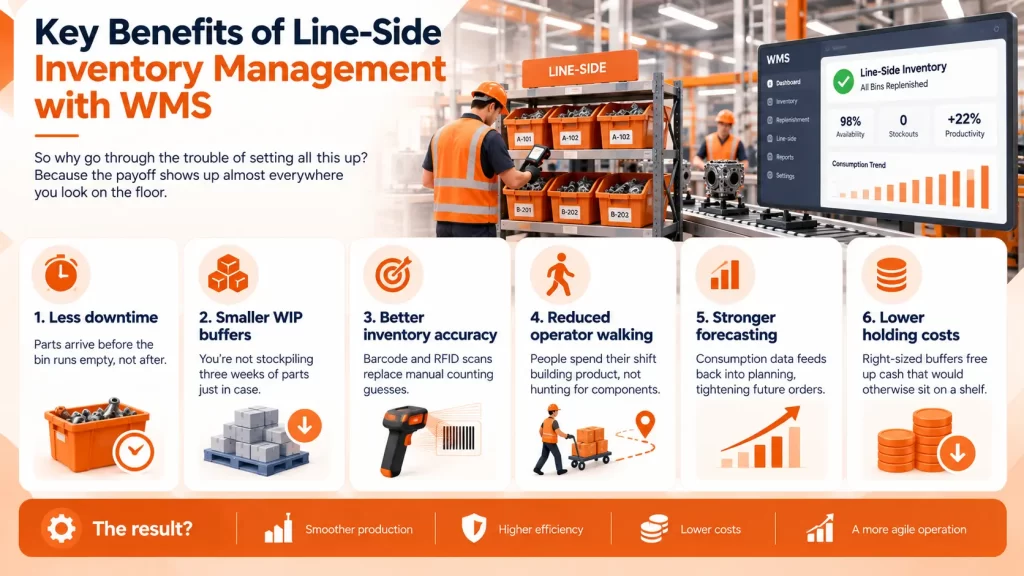
So why go through the trouble of setting all this up? Because the payoff shows up almost everywhere you look on the floor.
- Less downtime. Parts arrive before the bin runs empty, not after.
- Smaller WIP buffers. You’re not stockpiling three weeks of parts just in case.
- Better inventory accuracy. Barcode and RFID scans replace manual counting guesses.
- Reduced operator walking. People spend their shift building product, not hunting for components.
- Stronger forecasting. Consumption data feeds back into planning, tightening future orders.
- Lower holding costs. Right-sized buffers free up cash that would otherwise sit on a shelf.
None of these benefits happen in isolation, either. Reduce walking time and you naturally improve throughput. Improve accuracy and you naturally reduce the safety stock you need to carry. It’s a chain reaction, and it starts with getting replenishment right.
The Technology Behind the Scenes
A lot of this only works because of the hardware and sensors feeding data into the WMS. Here’s what’s typically involved:
- RFID tags identify totes, carts, and bins automatically as they pass sensors.
- RTLS (real-time location systems), often Bluetooth beacons or ultra-wideband tech, track high-value equipment like tuggers across the plant.
- AMRs and AGVs (autonomous mobile robots and automated guided vehicles) physically move parts without a human driver.
- Andon signals alert supervisors visually or audibly when something at the line needs attention.
- Tugger trains, sometimes called tow-line delivery, pull multiple carts of material along a fixed route on a schedule.
Layer all of that together and you get a system where the WMS isn’t just tracking inventory. It’s actively orchestrating the movement of material across the entire facility.
Common Challenges (and How WMS Solves Them)
No system is perfect out of the gate. A few headaches show up again and again when companies first implement line-side inventory management.
Stockouts still happening despite automation. Usually this traces back to replenishment points set too low or lead times that were underestimated. Most WMS platforms let you recalculate these thresholds based on actual historical consumption.
Too much safety stock piling up. Ironically, the fix for stockouts often overcorrects into excess inventory. A good WMS uses demand variability data to right-size buffers instead of padding everything equally.
Disconnected systems. If your WMS isn’t talking to your ERP or MES, you get data gaps. That’s where integration work upfront saves enormous headaches later.
Resistance from the floor. Operators used to grabbing whatever’s nearby don’t always love new bin discipline. Training and clear visual cues go a long way here, and the results speak for themselves. One heavy manufacturing company’s inventory accuracy case study shows exactly how much that discipline pays off once it sticks.
None of these problems are dealbreakers. They’re just the normal friction of changing how a plant operates, and they smooth out with time.
How to Implement Point-of-Use Replenishment with a WMS
If you’re starting from scratch, here’s a reasonable roadmap:
- Map your line layout. Know exactly where each part gets consumed and how often.
- Set replenishment points. Establish min-max levels or kanban card counts for each SKU.
- Choose a replenishment method. Match kanban, two-bin, min-max, or JIT/JIS to each item’s demand pattern.
- Integrate your WMS with ERP and MES. Make sure data flows both directions without manual re-entry.
- Deploy scanning or sensor technology. Barcode scanners, RFID, or photoelectric sensors, depending on your budget and precision needs.
- Monitor and adjust. Replenishment points aren’t set-it-and-forget-it. Revisit them quarterly as demand shifts.
Start small if you need to. Pilot the system on one production line before rolling it out plant-wide. You’ll catch configuration issues early, when they’re cheap to fix, instead of after you’ve scaled the mistake across the whole facility.
For further reading on lean methodology behind these systems, the Lean Enterprise Institute offers solid foundational resources on kanban and pull systems.
Wrapping It Up
Line-side inventory management with WMS isn’t some abstract warehouse concept. It’s the difference between a production line that runs smoothly and one that grinds to a halt every time a bin runs dry.
Point-of-use replenishment, backed by real-time data and automated triggers, keeps parts flowing exactly where and when they’re needed. Whether you lean on kanban, two-bin, min-max, or JIT/JIS delivery, the underlying goal never changes: match supply to actual consumption, not guesswork.
If your plant is still relying on manual stock checks and someone’s gut feeling about when to reorder, it might be time for a change. That’s exactly where Omneelab’s WMS comes in. Built for manufacturers who need line-side inventory tracked accurately and replenished automatically, it connects your shop floor to your ERP without the usual integration headaches, giving you real-time visibility from the warehouse right down to the production line.
Whether you’re setting up kanban loops for the first time or replacing a system that’s fallen behind your production pace, Omneelab’s team can help you map the right replenishment method to your line. Get in touch with Omneelab to see how point-of-use replenishment could look on your own floor, or book a free demo to walk through it live.
Frequently Asked Questions
A WMS (warehouse management system) tracks and manages inventory and storage locations. A WES (warehouse execution system) sits a layer above it, coordinating equipment and labor in real time on the plant floor. Many facilities run both together, with the WES handling live execution while the WMS manages the underlying inventory data.
A supermarket is a small, controlled buffer zone that sits between two production steps, typically between fabrication and assembly. Upstream processes replenish the supermarket based on kanban signals, and downstream processes pull from it as needed. It’s deliberately kept small so excess inventory can’t quietly accumulate.
A milk run is a scheduled delivery route where a vehicle, often a tugger train, makes repeated stops to drop off and pick up materials at multiple points along a set path. It’s named after old-fashioned milk delivery routes and works well for consolidating small, frequent line-side deliveries.
VMI shifts the responsibility of monitoring and restocking inventory to the supplier rather than the buyer. A WMS, on the other hand, is software the buyer uses to manage inventory internally. The two aren’t competitors. In fact, many operations combine them, using a WMS to track stock while a VMI arrangement handles supplier-side replenishment decisions.
A common formula multiplies the demand rate by the lead time, adds a safety factor for variability, and then divides by the container size. The result tells you roughly how many kanban cards, or containers, need to be circulating to keep the line supplied without excess buildup. Most WMS platforms can automate this calculation once you feed in historical consumption data.

Kapil Pathak is a Senior Digital Marketing Executive with over six years of experience specializing in the logistics and supply chain industry. His expertise spans digital strategy, search engine optimization (SEO), search engine marketing (SEM), and multi-channel campaign management. He has a proven track record of developing initiatives that increase brand visibility, generate qualified leads, and drive growth for D2C & B2B technology companies.