Searching for the right WMS for Blinkit sellers in India? You are in the right place. Before we get into features and integrations, let’s start with a scene you may recognize.
It is 11:42 AM on a Tuesday. A purchase order from Blinkit lands in your sales manager’s inbox. He is in a meeting. By the time he forwards it to your warehouse team, it is 4 PM. Your team now has less time to pick, pack, label, and book a delivery appointment at the dark store.
The shipment goes out late. Your fill rate drops. And because Blinkit watches fill rates closely, your next purchase order is smaller than the last one.
Sound familiar? If you sell on Blinkit, it probably does.
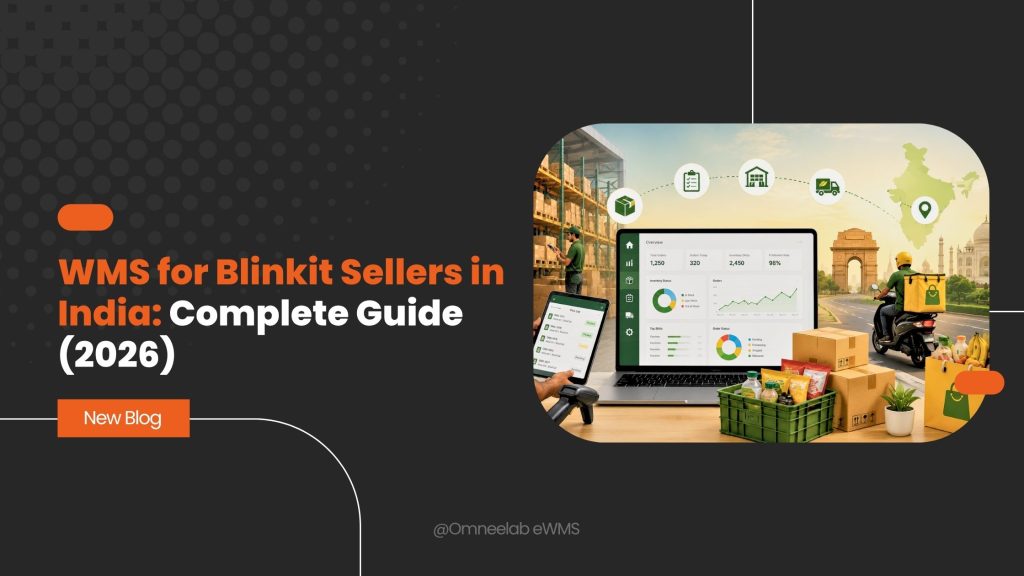
Here is the thing. Most sellers lose money on Blinkit not because their products do not sell, but because their warehouse operations cannot keep up with how quick commerce works. The fix is not more staff or more spreadsheets. It is a warehouse management system (WMS) built to handle Blinkit’s unique fulfillment model.
In this guide, we will cover how selling on Blinkit actually works, why its purchase order system breaks traditional warehouse setups, and how the right WMS for Blinkit sellers in India can turn fill rate from your biggest headache into your biggest advantage. Let’s get into it.
Why Blinkit Matters for Indian Sellers in 2026
Quick commerce is no longer an experiment. India’s quick commerce market is expected to cross US$6.9 billion in 2026, according to industry estimates from IBEF. Blinkit, owned by Eternal (formerly Zomato), sits at the front of this race alongside Zepto and Swiggy Instamart.
What makes Blinkit different from Amazon or Flipkart? Speed and structure.
Blinkit promises delivery in about 10 minutes. To pull that off, it runs hundreds of dark stores, small micro-warehouses placed inside city neighbourhoods. Each dark store stocks a limited range of fast-moving products. When a customer orders, a picker grabs the item from a shelf a few kilometres away and a rider delivers it.
For you as a seller, this changes everything:
- You do not ship to customers. You ship in bulk to Blinkit’s dark stores and warehouses.
- Blinkit decides what to buy from you through purchase orders (POs), based on how fast your stock sells.
- Your performance is measured on fill rate and on-time delivery, not on customer ratings alone.
In short, selling on Blinkit looks less like e-commerce and more like supplying a fast-moving retail chain. And that is exactly why a dedicated WMS for Blinkit sellers in India has become standard kit for serious quick commerce suppliers.
How Selling on Blinkit Works: A Quick Refresher
Before we talk about software, let’s make sure the basics are clear. If you are already live on Blinkit, feel free to skip ahead to the PO section.
Registering on the Blinkit Seller Hub
Getting started is fairly simple. You register on the Blinkit Seller Hub, verify your email and mobile number, and submit your business details. You will need:
- GSTIN (15-digit GST number registered to your business)
- PAN card
- FSSAI license if you sell food or beverages
- Bank details and a cancelled cheque
- Address proof for your business
The registration flow itself takes minutes:
- Visit the Blinkit Seller Hub and choose “Sell on Blinkit”.
- Verify your email and mobile number with OTPs.
- Enter your business details and selling category.
- Add your 15-digit GSTIN and let Blinkit auto-verify your business information.
- Review everything and submit.
There is no registration fee. Approval usually takes 7 to 15 working days, after which Blinkit’s team confirms your onboarding by email. Use the waiting period wisely: get your barcodes in order, finalize packaging, and set up warehouse processes before your first PO arrives.
SOR vs Outright: The Two Selling Models
Blinkit offers two main working models, and your choice affects your costs and inventory risk:
- Seller on Record (SOR): You own the inventory until it sells. Blinkit charges a storage fee of about ₹1 per unit per day while your stock sits in its warehouse. Unsold stock is your problem.
- Outright (OR): Blinkit buys stock from you outright. There are no storage fees and no deposit, but you commit to advertising spend as a percentage of the PO value.
What Selling on Blinkit Costs
Commission slabs on Blinkit typically range from 2% to 18% depending on category and price point. On top of that, sellers pay an inwarding fee (around ₹5 per unit when stock is received at a dark store) and fulfillment charges that cover picking, packing, and the 10-minute delivery.
Why does this matter for a WMS discussion? Because every fee is charged per unit. Sloppy inventory practices, wrong quantities, mislabeled cartons, and failed inwarding do not just cost goodwill. They cost real money on every single unit.
How Blinkit’s Purchase Order System Works (And Where Sellers Struggle)
This is the heart of the matter, so let’s slow down here.
The PO Lifecycle
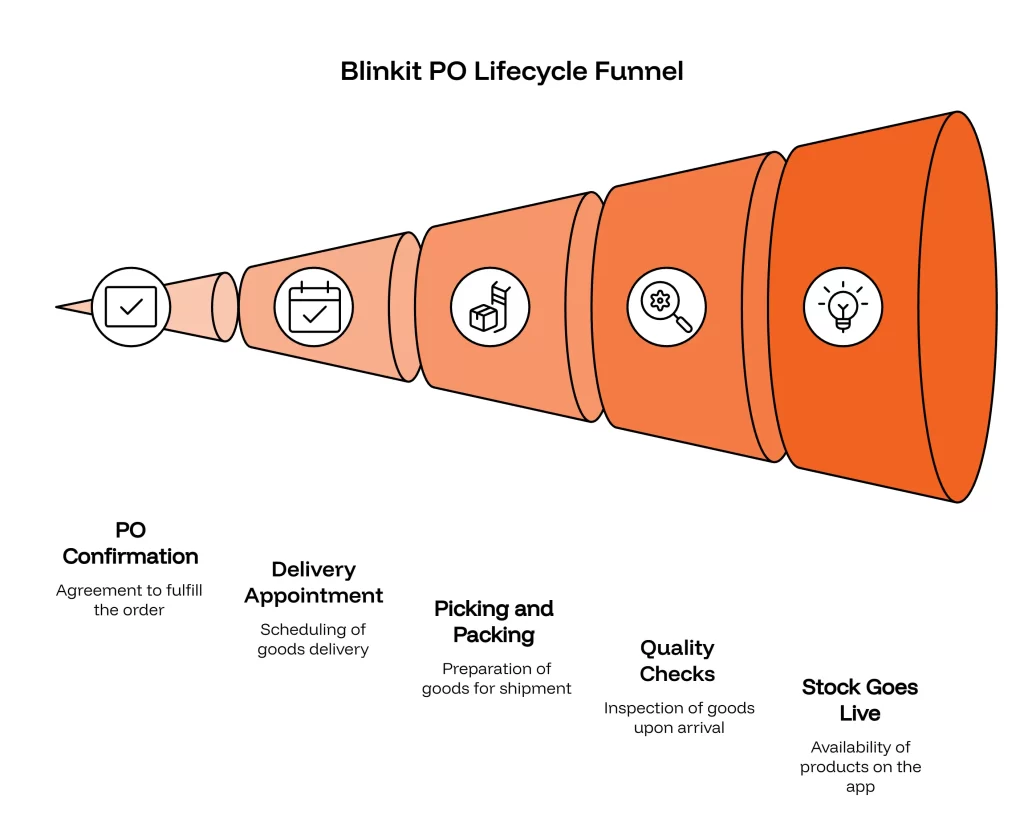
Blinkit does not let you push inventory whenever you like. Instead, its system studies the sales velocity of your products at each dark store and raises a purchase order when stock runs low. A typical PO cycle looks like this:
- PO arrives, usually by email, listing exact SKUs, quantities, and the destination facility.
- You confirm the PO and book a delivery appointment at the specified warehouse or dark store.
- Your team picks, packs, labels cartons with the right barcodes, and generates the invoice.
- Goods reach the facility, where Blinkit performs quality checks and creates a GRN (Goods Received Note).
- Stock goes live on the app, and payment follows as per your agreement.
The Rules That Catch Sellers Off Guard
Two Blinkit policies trip up new sellers more than anything else:
- Fill rate is everything. If the PO asks for 500 units, Blinkit expects 500 units, on time and in full (OTIF). Short shipments and delays drag your fill rate down, and a poor fill rate leads to smaller and less frequent POs.
- The 80% sell-through rule. Your next PO generally arrives only after you have sold around 80% of your current stock, often on a roughly 30-day cycle. Miss one PO and you may wait weeks for another chance.
Think of it like a cricket selector watching your strike rate. Perform consistently and you stay in the team. One bad series and you are warming the bench.
Why Manual Processes Fail Here
Now picture handling all of this with WhatsApp messages and Excel sheets:
- POs arrive by email, so someone must spot them, read them, and forward them to the warehouse. Any delay eats into your fulfillment window.
- Each PO maps to a specific facility ID. Sending stock to the wrong dark store, or with the wrong batch labels, means rejection at the gate.
- You must know, at any moment, exactly how much sellable stock you hold per SKU per location. A stock count that is off by even 5% leads to confirmed POs you cannot fulfill.
One missed email can cost you a month of sales. That is not an exaggeration. It is how the system is designed, and it is the single strongest argument for a WMS for Blinkit sellers in India.
What Is a WMS for Blinkit Sellers in India?
A warehouse management system is software that runs your warehouse operations: receiving, putaway, storage, picking, packing, and dispatch. A WMS for Blinkit sellers in India goes a step further. It connects your warehouse directly to Blinkit’s seller ecosystem so that POs, inventory levels, and dispatches flow automatically between both systems.
If you are new to warehouse software, our introduction to warehouse management covers the foundations. For Blinkit specifically, the WMS plays three roles:
- A listener: It captures every Blinkit PO the moment it arrives, whether through API webhooks or automated email parsing, and converts it into a warehouse order instantly.
- A controller: It allocates stock, creates pick lists, enforces batch and expiry rules, and ensures the right cartons reach the right facility on schedule.
- A mirror: It keeps your internal stock records and Blinkit’s view of your inventory in sync, so you never confirm a PO you cannot honour.
That combination is what separates Blinkit WMS integration from generic inventory software. A basic tool tracks stock. An integrated WMS runs the entire PO-to-dispatch workflow without anyone forwarding emails.
7 WMS Features Every Blinkit Seller Needs
Not all warehouse software is built for quick commerce. When you evaluate a WMS for Blinkit sellers in India, these are the features that actually move the needle.
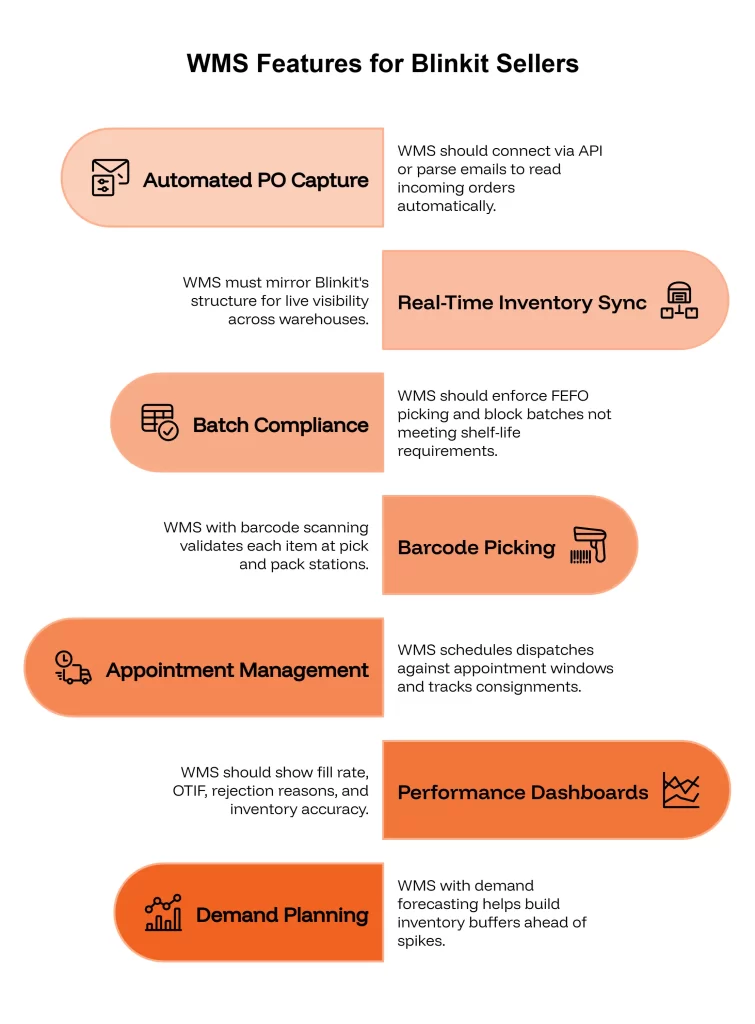
1. Automated PO Capture and Processing
This is the big one. Since Blinkit POs often arrive by email, your WMS should either connect through API integration or use email PO parsing to read incoming orders automatically. The moment a PO lands, the system should create a sales order, check stock availability, and alert your team.
No forwarding. No copy-pasting into Excel. No 4 PM surprises.
2. Real-Time, Multi-Location Inventory Sync
Blinkit tracks your stock using identifiers like the backend facility ID (which warehouse or dark store holds the stock) and the frontend inventory quantity (what customers can actually buy on the app). Your WMS must mirror this structure.
That means live visibility of every SKU across your own warehouses plus stock lying at Blinkit facilities. If you also sell on other channels, you need a single inventory pool with smart allocation, something we cover in detail in our guide to multi-warehouse inventory management in India.
3. Batch, Expiry, and MRP Compliance
Most products sold on Blinkit are FMCG: snacks, beverages, personal care, dairy. Blinkit’s quality checks at inwarding are strict about expiry dates and MRP labels. A carton with short-dated stock can be rejected on the spot.
Your WMS should enforce FEFO (First Expiry, First Out) picking and block any batch that does not meet Blinkit’s minimum shelf-life requirement. Our deep dive on batch and expiry tracking in FMCG explains how this works in practice.
4. Barcode-Driven Picking and Packing
Every unit going into a Blinkit facility needs the correct EAN or UPC barcode. Manual labeling at scale is a recipe for errors. A WMS with barcode scanning validates each item at pick and pack stations, so the carton that leaves your dock matches the PO line by line.
The result? Fewer rejections at the GRN stage and a cleaner fill rate.
5. Appointment and Dispatch Management
Blinkit deliveries are appointment-based. Arrive late and you may lose your slot. A good WMS schedules dispatches against appointment windows, prints facility-specific labels and invoices, and tracks every consignment until the GRN is confirmed.
6. Fill Rate and OTIF Dashboards
You cannot improve what you do not measure. Your WMS should show fill rate percentage, OTIF performance, PO rejection reasons, and inventory accuracy per facility, all in one view. Our guide to warehouse KPIs and metrics lists the numbers worth tracking.
7. Demand Planning for Festive Spikes
Quick commerce demand in India swings hard during Diwali, Holi, and big sale events. Blinkit raises larger POs in these windows, and sellers who run out of stock miss the wave entirely. A WMS with demand forecasting helps you build inventory buffers ahead of the spike instead of reacting after it.
How Blinkit WMS Integration Actually Works
Wondering what the integration looks like under the hood? Here is the typical setup, step by step.
Step 1: Connect the channels. Your WMS connects to Blinkit through available APIs and webhooks, or through a structured email parser that reads PO documents automatically. Many sellers also link their ERP at this stage, so finance and warehouse data stay aligned. (See our guide on WMS and ERP integration for how that layer fits.)
Step 2: Map your catalog. Each SKU is mapped to Blinkit’s product codes, barcodes, and facility IDs. This one-time exercise prevents most mismatch errors later.
Step 3: Automate the PO flow. Incoming POs are converted into warehouse orders automatically. The system checks stock, reserves quantities, and schedules picking against the delivery appointment.
Step 4: Execute with scanning. Pickers follow system-generated pick lists, scanning each item. Packers verify cartons against the PO. Invoices and labels print directly from the WMS.
Step 5: Reconcile and learn. After dispatch, the WMS tracks GRN confirmation, flags shortages or rejections, and feeds the data back into your fill rate dashboard and demand forecasts.
Once this loop runs smoothly, a PO that used to take a full day of coordination gets processed in minutes.
The Payoff: What Changes After You Implement a WMS
Let’s talk outcomes, because software is only worth what it returns. Here is what a well-implemented WMS for Blinkit sellers in India typically delivers.
- Higher fill rates. Automated PO capture and accurate stock data mean you confirm only what you can ship, and ship everything you confirm. Sellers routinely push fill rates above 95% after automation.
- Bigger, more frequent POs. Blinkit’s algorithm rewards reliable suppliers. Better fill rates and faster sell-through directly translate into larger orders.
- Fewer rejections and penalties. Barcode validation and FEFO picking cut GRN rejections sharply.
- Lower working capital stress. With accurate visibility, you stop overstocking “just in case” and free up cash. Our piece on costly inventory management mistakes shows how much guesswork really costs.
- A team that scales. The same staff can handle three times the PO volume when the system does the coordination.
Put simply: before automation, every Blinkit PO feels like a fire drill. After, it becomes just another order in the queue.
Blinkit vs Zepto vs Swiggy Instamart: Does Your WMS Strategy Change?
Most serious quick commerce sellers do not stop at one platform. Zepto and Swiggy Instamart follow broadly similar models: dark stores, purchase orders, fill rate expectations, and appointment-based deliveries. The details differ in commission structures, PO formats, and portal workflows.
Here is the practical takeaway. If your WMS handles Blinkit well, adding Zepto and Instamart becomes an integration exercise rather than an operational rebuild. You keep one inventory pool, one set of warehouse processes, and one dashboard, with each platform plugged in as a channel.
That is also why choosing a WMS with multi-channel architecture matters from day one, even if Blinkit is your only quick commerce channel today. Our overview of dark store WMS for quick commerce in India explores this model from the platform side.
How Blinkit Fulfillment Differs from Amazon and Flipkart
If you already sell on marketplaces, you might assume your existing setup will carry over. It will not, and here is why.
| Aspect | Amazon / Flipkart | Blinkit |
|---|---|---|
| Order type | Individual customer orders | Bulk purchase orders (POs) |
| Who decides quantity | The customer | Blinkit’s demand algorithm |
| Shipping destination | Customer address or FC | Specific dark stores and warehouses |
| Key metric | Seller rating, returns | Fill rate, OTIF, sell-through |
| Reorder logic | Continuous | PO-based, tied to ~80% sell-through |
| Delivery window | Courier pickup | Fixed appointment slots |
Marketplace fulfillment is a steady stream of small orders. Blinkit fulfillment is a series of high-stakes bulk shipments. One missed marketplace order costs you a sale. One missed Blinkit PO can cost you a month of revenue at that facility.
This is why sellers who treat Blinkit like “just another channel” in their marketplace tooling struggle. The workflows are fundamentally different, and your WMS needs to support both side by side. If you sell across platforms, our guides on WMS for Flipkart sellers and Amazon FBA vs WMS integration show how the marketplace half of your stack should work.
5 Common Mistakes Blinkit Sellers Make (And How a WMS Prevents Them)
After working with quick commerce sellers across India, we see the same errors repeat. Check how many apply to you.
Mistake 1: Treating PO emails as routine mail. A PO sitting unread for a few hours compresses your entire fulfillment window. A WMS with automated PO capture turns every email into an actionable order within minutes, with alerts to the right people.
Mistake 2: Confirming POs against stale stock data. If your stock register updates once a day, you are confirming orders against yesterday’s truth. Real-time inventory sync ensures you commit only what is physically available and unreserved.
Mistake 3: Ignoring shelf-life rules until the truck reaches the dark store. Blinkit’s quality team will reject short-dated stock at inwarding. FEFO-driven picking inside the WMS stops near-expiry batches from ever leaving your warehouse.
Mistake 4: Underestimating festive demand. Sellers plan for average weeks, then Diwali POs arrive at three times the usual size. Demand forecasting and buffer stock planning keep you ready for the spike instead of scrambling through it.
Mistake 5: Measuring nothing. Many sellers cannot tell you their fill rate from last month. Without that number, you are negotiating with Blinkit blind. A WMS dashboard makes fill rate, OTIF, and rejection trends visible weekly, so problems surface while they are still small.
Notice the pattern? None of these mistakes come from bad products or lazy teams. They come from running a quick commerce business on tools built for a slower era.
How to Choose the Right WMS for Blinkit Sellers in India
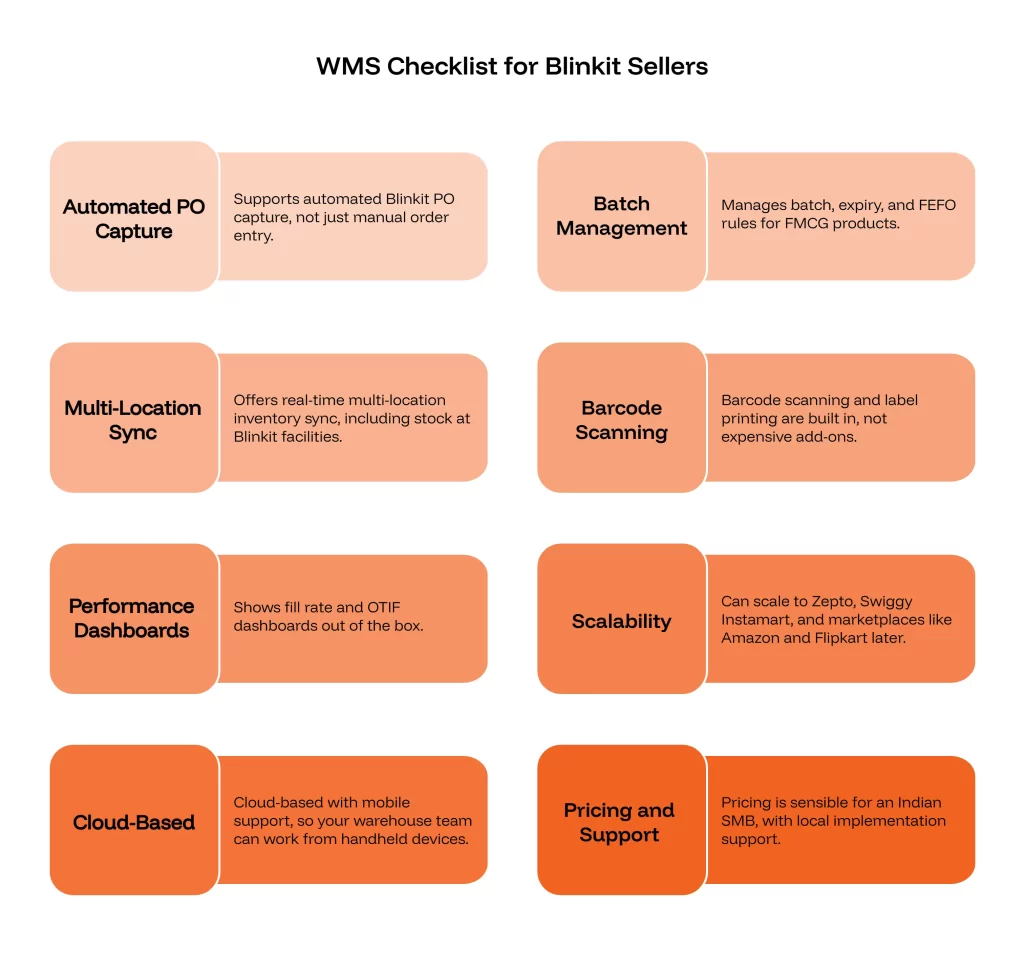
Before you sign up for any system, run it through this checklist:
- Does it support automated Blinkit PO capture (API or email parsing), not just manual order entry?
- Can it manage batch, expiry, and FEFO rules for FMCG products?
- Does it offer real-time multi-location inventory sync, including stock at Blinkit facilities under the SOR model?
- Are barcode scanning and label printing built in, or expensive add-ons?
- Does it show fill rate and OTIF dashboards out of the box?
- Can it scale to Zepto, Swiggy Instamart, and marketplaces like Amazon and Flipkart later?
- Is it cloud-based with mobile support, so your warehouse team can work from handheld devices?
- Is the pricing sensible for an Indian SMB, with local implementation support?
If a vendor cannot answer yes to the first three, keep looking. Those are non-negotiable for quick commerce.
How to Increase Your Fill Rate on Blinkit: 6 Practical Tips
Since fill rate decides your future on the platform, it deserves its own playbook. Here is what consistently works.
Tip 1: Hold a dedicated buffer for Blinkit. Do not let marketplace orders eat into stock you may need for a PO. Reserve a channel-specific buffer for your fastest-moving Blinkit SKUs, sized on recent PO history.
Tip 2: Confirm POs within hours, not days. Faster confirmation gives your warehouse the longest possible runway to pick, pack, and book the appointment slot.
Tip 3: Pre-stage high-velocity SKUs. If the same 20 SKUs appear on every PO, keep them pre-labeled and slotted near your packing stations. Smart warehouse slotting can cut picking time dramatically.
Tip 4: Audit barcodes monthly. A single wrong EAN can void an entire carton at inwarding. Periodic barcode audits catch label drift before Blinkit does.
Tip 5: Watch sell-through weekly. Since the next PO depends on roughly 80% sell-through, track how fast your stock moves at each facility. Slow movers may need PLA advertising support or price adjustments to clear.
Tip 6: Review rejection reasons after every GRN. Each rejection is free consulting. Whether it is short shelf life, damaged cartons, or quantity mismatches, fix the root cause and your fill rate climbs on its own.
Sellers who follow this routine typically see fill rates stabilize above 95% within two to three PO cycles. That is the level where Blinkit’s algorithm starts treating you as a preferred supplier. Notice that a good WMS for Blinkit sellers in India automates four of these six tips out of the box.
Who Needs a WMS for Blinkit Sellers in India? D2C Brands, Distributors, and 3PLs
One last point before we wrap up, because this question comes up a lot: is a WMS only for big FMCG companies? Not at all.
D2C brands moving into quick commerce often feel the pain first. Their teams are built for direct orders, not bulk POs with appointment slots. A WMS bridges that gap without hiring a supply chain department.
Distributors and resellers working with multiple brands face SKU sprawl. Hundreds of products, several Blinkit facilities, and POs arriving daily make manual coordination impossible past a certain scale.
Third-party logistics providers (3PLs) are increasingly offering quick commerce fulfillment as a service. For them, a multi-client WMS with Blinkit integration is the product. Our 3PL warehouse management guide covers how that model scales.
Even smaller sellers benefit. Cloud-based WMS pricing in India has dropped to a point where the software often costs less than one month of fill-rate penalties and missed POs. If you are doing more than a handful of Blinkit POs a month, the math usually favours automation. For a sense of what entry-level systems look like, see our guide to WMS software for small businesses in India.
Conclusion: Win the Fill Rate Game
Selling on Blinkit is a volume opportunity that did not exist five years ago. But the platform plays by retail supply chain rules: exact quantities, tight timelines, and performance-linked reordering. Spreadsheets and email forwarding simply cannot compete at that pace.
A purpose-built WMS for Blinkit sellers in India automates PO capture, keeps inventory accurate across every location, enforces batch and expiry compliance, and protects the one metric that decides your growth on the platform: fill rate.
The sellers winning on Blinkit in 2026 are not necessarily the ones with the best products. They are the ones whose warehouses never miss a PO.
Ready to automate your Blinkit fulfillment? Book a free demo of Omneelab WMS and see how quickly your PO-to-dispatch workflow can run on autopilot.
Frequently Asked Questions
Yes. Blinkit supports integrations through APIs, webhooks, and structured email PO parsing. A modern WMS for Blinkit sellers in India connects these to your ERP so purchase orders, invoices, and inventory updates flow automatically across your WMS-OMS-ERP stack.
Fill rate is the percentage of ordered units you deliver on time and in full (OTIF). Blinkit’s reordering algorithm uses it to decide how large and how frequent your future POs will be. A consistently high fill rate means more business; a poor one quietly shrinks your sales.
Under Seller on Record (SOR), you own the stock until it sells and pay storage fees of roughly ₹1 per unit per day. Under Outright (OR), Blinkit purchases inventory from you directly, with no storage fee but a mandatory advertising commitment. A WMS helps in both cases by keeping stock at Blinkit facilities visible and reconciled.
Blinkit assigns stock to facilities using backend facility IDs, while the frontend inventory quantity shows what customers can buy. A WMS mirrors this structure, tracking sellable stock per SKU per location in real time, so you always know where inventory sits and when to replenish each facility.
It can be, with discipline. Commissions range from about 2% to 18%, plus per-unit inwarding and fulfillment charges. Profitability depends on minimizing avoidable costs: GRN rejections, expired stock, missed POs, and excess storage fees. That is precisely where warehouse automation pays for itself.

Kapil Pathak is a Senior Digital Marketing Executive with over six years of experience specializing in the logistics and supply chain industry. His expertise spans digital strategy, search engine optimization (SEO), search engine marketing (SEM), and multi-channel campaign management. He has a proven track record of developing initiatives that increase brand visibility, generate qualified leads, and drive growth for D2C & B2B technology companies.