Picture this: Your sales team just closed a massive deal. Orders are flooding in. But instead of celebrating, your warehouse team is scrambling through spreadsheets, manually updating inventory counts, and praying nothing falls through the cracks. Sound familiar?
This disconnect between your warehouse management system and enterprise resource planning software is more than just an inconvenience. It’s costing you money, customers, and countless hours of productivity.
Here’s the good news: WMS ERP integration can eliminate these headaches entirely.
In this complete guide, we’ll walk you through everything you need to know about connecting your warehouse management system with your ERP. You’ll learn what this integration actually means, why it matters for your business, how to make it happen, and what challenges to watch out for along the way.
Whether you’re running a small distribution center or managing a complex multi-warehouse operation, this guide will give you the knowledge to make informed decisions about your ERP WMS integration strategy. Let’s dive in.
What is WMS ERP Integration?
Before we get into the how, let’s make sure we’re on the same page about the what. WMS ERP integration is the process of connecting your warehouse management software with your enterprise resource planning system. This connection allows both systems to share data automatically and in real time.
Think of it like building a bridge between two islands. On one island, you have your WMS handling everything that happens inside your warehouse—picking, packing, shipping, receiving, and inventory tracking. On the other island, your ERP manages the bigger picture—financials, procurement, sales orders, and customer relationships.
Without a bridge, people on each island have to shout information back and forth. Messages get lost. Details get garbled. Chaos ensues. With warehouse management system ERP integration, data flows seamlessly between both systems. When a customer places an order in your ERP, your WMS knows about it instantly. When inventory moves in your warehouse, your ERP reflects the change automatically.
No more manual data entry. No more discrepancies. No more shouting across the water. To understand the various types of WMS integrations and their benefits, it’s important to first grasp these fundamentals.
WMS vs ERP: Understanding the Difference
One question we hear constantly is: “What’s the difference between WMS and ERP?” It’s a fair question. Both systems deal with inventory. Both help manage operations. The lines can seem blurry.
Here’s the simplest way to think about it:
ERP (Enterprise Resource Planning) is your company’s central nervous system. It connects and manages core business processes across your entire organization:
- Financial management and accounting
- Human resources
- Procurement and purchasing
- Sales and customer management
- Basic inventory tracking
- Manufacturing planning
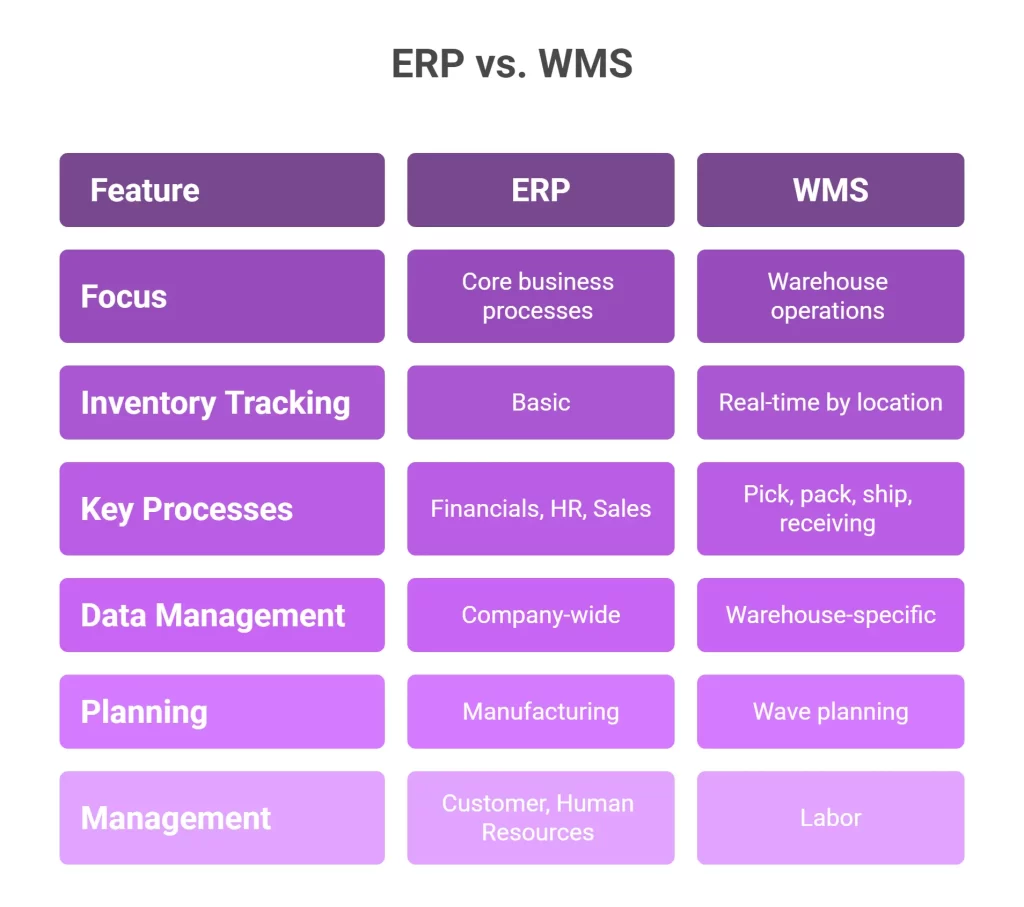
WMS (Warehouse Management System) is a specialized tool focused exclusively on warehouse operations. If you’re new to this concept, our introduction to warehouse management covers the basics comprehensively:
- Real-time inventory tracking by location
- Pick, pack, and ship optimization
- Receiving and putaway processes
- Barcode scanning and SKU management
- Labor management
- Wave planning and task allocation
The key difference? Depth versus breadth. Your ERP knows that you have 500 units of Product A. Your WMS knows that 200 units are in Aisle 3, Bin 7, another 150 units are in the overflow zone, and 150 units just arrived on this morning’s truck and need to be put away.
Can WMS replace ERP? No. Can ERP replace WMS? Also no.
They serve different purposes. And when you integrate WMS with ERP, you get the best of both worlds.
Why Should You Integrate WMS with ERP?
Let’s be honest. Integration projects aren’t cheap or simple. So why bother? Because the alternative is worse.
When your systems don’t talk to each other, you end up with:
- Manual data entry (and the errors that come with it)
- Inventory discrepancies between systems
- Delayed order fulfillment
- Poor supply chain visibility
- Frustrated customers
- Overworked staff
WMS and ERP integration solves these problems by creating a single source of truth for your operations.
Benefits of WMS ERP Integration
Here’s what you gain when you connect these systems:
1. Real-Time Inventory Accuracy
With real-time WMS ERP integration, inventory updates happen instantly. Sell a product? Both systems know. Receive a shipment? Both systems update. No more end-of-day reconciliation headaches. Understanding inventory visibility trends and challenges helps you maximize this benefit.
2. Faster Order Fulfillment
Orders flow directly from your ERP to your WMS without delay. Your warehouse team can start picking immediately, reducing order processing time significantly.
3. Reduced Operational Costs
Eliminating manual data entry saves labor hours. Accurate inventory reduces overstocking and stockouts. Better visibility enables smarter purchasing decisions. The cost reduction adds up quickly.
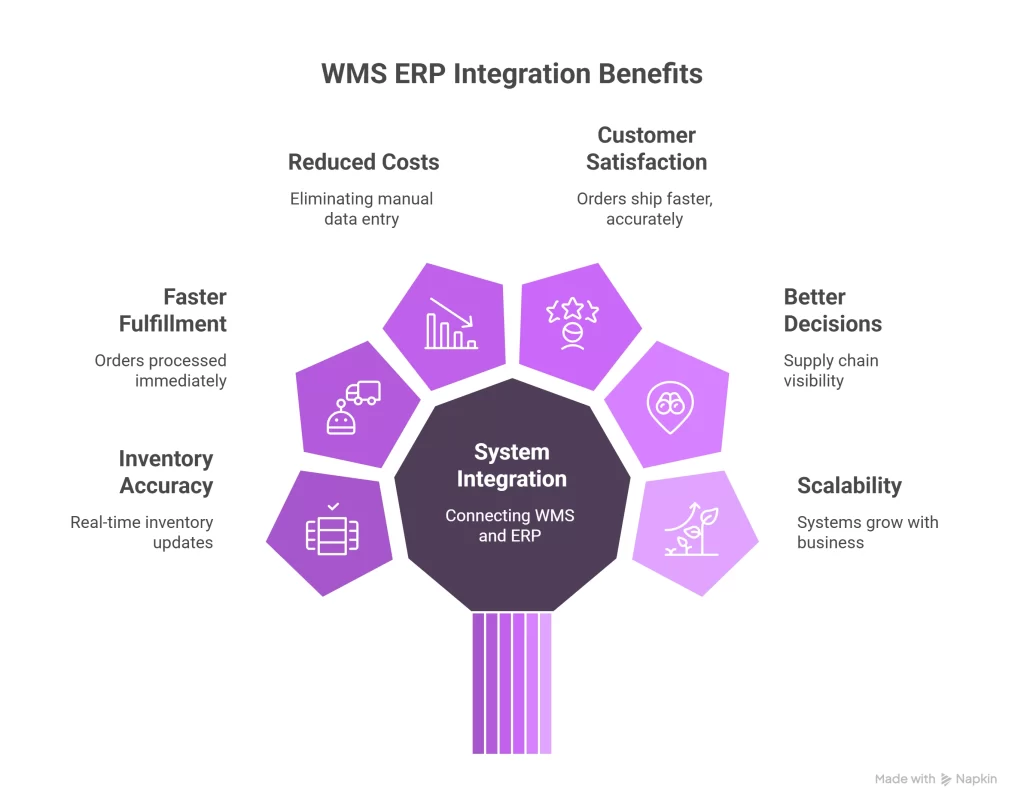
4. Improved Customer Satisfaction
When orders ship faster and inventory information is accurate, customers get what they want when they expect it. That builds loyalty.
5. Better Decision Making
Supply chain visibility across both systems gives you insights you simply can’t get otherwise. Learn more about why visibility in supply chain is important for your business.
6. Scalability
As your business grows, integrated systems grow with you. Adding new warehouses, channels, or products becomes manageable instead of chaotic.
What Data is Shared Between WMS and ERP?
Understanding what information flows between systems helps you plan your integration strategy.
Here’s what typically gets exchanged:
From ERP to WMS:
- Sales orders and order details
- Customer information
- Product master data (SKUs, descriptions, dimensions)
- Purchase orders for inbound shipments
- Inventory adjustments
- Pricing information
From WMS to ERP:
- Shipment confirmations
- Inventory counts and updates
- Receiving confirmations
- Pick/pack status updates
- Serial and lot number tracking
- Returns processing data
This bidirectional sync ensures both systems always reflect current reality. The data synchronization happens continuously, not just at scheduled intervals.
How Does a WMS Connect to an ERP System?
Now we’re getting to the technical stuff. Don’t worry—we’ll keep it practical.
There are several methods for WMS ERP software integration, each with pros and cons:
API Integration
API connectivity (Application Programming Interface) is the most modern approach. APIs allow systems to communicate directly using standardized protocols.
Pros:
- Real-time data exchange
- Highly customizable
- Scalable architecture
- Works well with cloud-based integration
Cons:
- Requires technical expertise
- May need ongoing maintenance
- Initial development can be complex
WMS ERP API integration is ideal for businesses needing real-time updates and custom functionality.
Middleware Solutions
Middleware acts as a translator between your systems. It sits in the middle, receiving data from one system, transforming it, and sending it to the other.
Pros:
- Connects systems that weren’t designed to work together
- Handles complex data transformations
- Can integrate multiple systems simultaneously
Cons:
- Adds another system to maintain
- Can create latency
- Additional licensing costs
What is middleware in WMS ERP integration? Think of it as a universal adapter. It doesn’t care what language each system speaks—it translates everything.
EDI Integration
EDI integration (Electronic Data Interchange) uses standardized document formats to exchange information. It’s been around for decades and remains common in certain industries.
Pros:
- Industry-standard formats
- Reliable and proven
- Works with legacy systems
Cons:
- Less flexible than APIs
- Can be expensive to set up
- Not truly real-time
Pre-Built Connectors
Many WMS integration solutions offer pre-built connectors for popular ERP systems. These WMS ERP connectors provide out-of-the-box integration with minimal customization.
Pros:
- Faster implementation
- Lower development costs
- Tested and proven
Cons:
- Limited flexibility
- May not support custom workflows
- Dependent on vendor updates
Step-by-Step Guide: How to Integrate WMS with ERP
Ready to make this happen? Here’s a practical roadmap for how to integrate WMS with ERP:
Step 1: Assess Your Current State
Before changing anything, document what you have:
- What ERP system are you using?
- Do you have an existing WMS?
- What manual processes connect them today?
- Where are the biggest pain points?
Step 2: Define Your Requirements
Get specific about what you need:
- Which data needs to sync?
- How quickly must updates occur?
- What workflows need automation?
- Who will use each system?
Step 3: Choose Your Integration Method
Based on your requirements and technical capabilities, select the right approach:
- API integration for real-time, custom needs
- Middleware for complex, multi-system environments
- Pre-built connectors for standard configurations
- EDI for industry-specific requirements
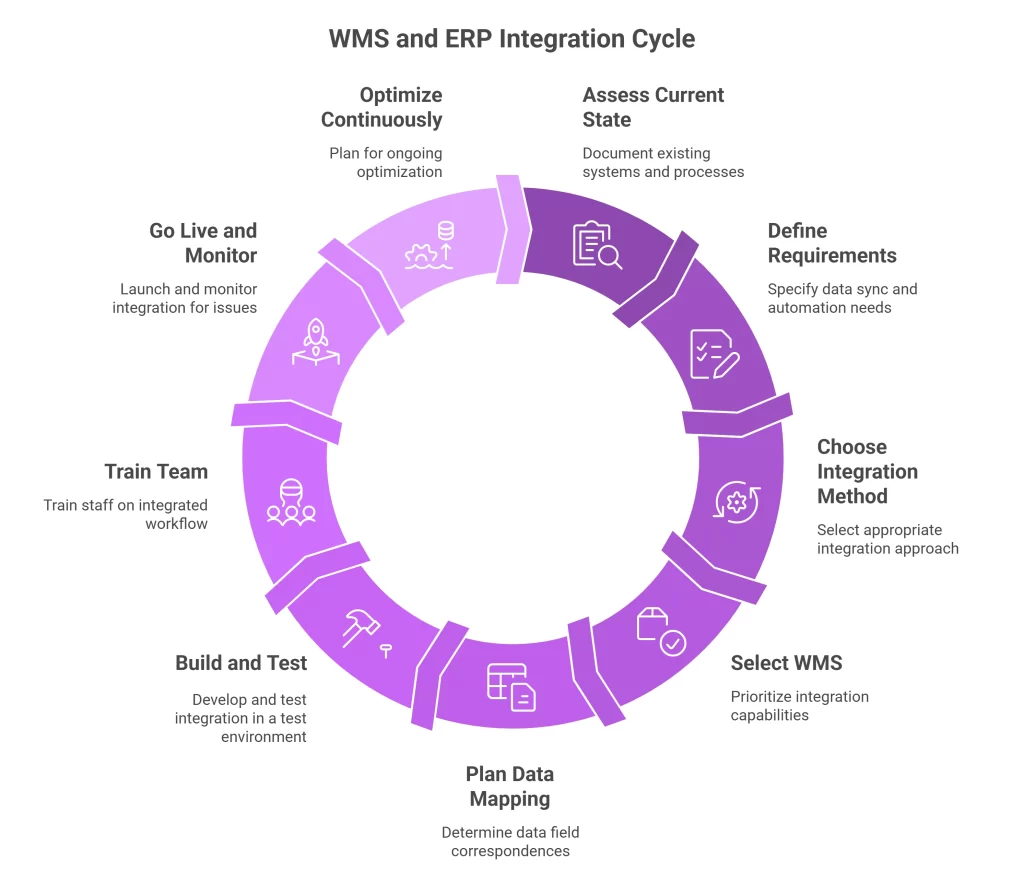
Step 4: Select the Right WMS (If Needed)
If you’re choosing a new WMS, prioritize integration capabilities. Our guide on choosing the right warehouse management solution can help you evaluate options. Look for:
- Native connectors for your ERP
- Open API architecture
- Proven integration track record
- Strong vendor support
Step 5: Plan Data Mapping
Determine how data fields in one system correspond to fields in the other. This data mapping exercise is critical for successful integration.
Step 6: Build and Test
Develop your integration in a test environment first. Never go straight to production. Test thoroughly with realistic scenarios.
Step 7: Train Your Team
Technology only works if people know how to use it. Train warehouse staff, IT personnel, and management on the integrated workflow.
Step 8: Go Live and Monitor
Launch your integration and watch it closely. Monitor for errors, delays, or unexpected behaviors. Be ready to troubleshoot.
Step 9: Optimize Continuously
Integration isn’t a one-time project. As your business evolves, your integration needs will too. Plan for ongoing optimization.
WMS ERP Integration Challenges (And How to Overcome Them)
Let’s be real. WMS ERP integration challenges exist, and pretending otherwise won’t help you succeed. Understanding common inventory management challenges prepares you for what’s ahead.
Here are the most common obstacles and how to handle them:
Data Quality Issues
The Problem: Garbage in, garbage out. If your source data is messy, integration amplifies the mess.
The Solution: Clean your data before integrating. Standardize product codes, customer records, and inventory counts. This upfront work pays dividends.
System Compatibility
The Problem: Legacy systems weren’t built for modern integration. Getting them to communicate can be painful.
The Solution: Middleware can bridge compatibility gaps. Alternatively, consider whether it’s time to upgrade outdated systems.
Scope Creep
The Problem: Projects expand beyond original plans, blowing budgets and timelines.
The Solution: Define clear requirements upfront. Document what’s in scope and what’s not. Resist the urge to add “just one more thing.”
Organizational Resistance
The Problem: People resist change, especially when it affects their daily work.
The Solution: Involve stakeholders early. Communicate benefits clearly. Provide thorough training. Celebrate wins along the way.
Integration Maintenance
The Problem: System updates can break integrations. What works today might not work after the next upgrade.
The Solution: Choose integration methods with good version support. Budget for ongoing maintenance. Keep documentation current.
How Much Does WMS ERP Integration Cost?
Ah, the money question. WMS ERP integration cost varies widely based on several factors:
Factors Affecting Cost:
- Complexity of your systems
- Integration method chosen
- Customization requirements
- Number of data touchpoints
- Vendor licensing fees
- Implementation partner rates
- Training needs
These numbers might seem steep. But consider the cost of not integrating: labor hours spent on manual entry, errors that cost customers, inventory discrepancies that hurt cash flow.
Most businesses see positive ROI within 12-18 months of successful integration.
How Long Does WMS ERP Integration Take?
Timeline Expectations:
- Simple pre-built connector: 4-8 weeks
- Standard API integration: 1-2 months
- Complex custom integration: 3-4 months
- Enterprise multi-system projects: 5-6+ months
Factors that extend timelines include:
- Custom development requirements
- Data migration complexity
- Testing and validation needs
- Organizational readiness
- Change management activities
Plan conservatively. It’s better to under-promise and over-deliver than the reverse.
How to Choose the Best WMS for ERP Integration
If you’re selecting a new warehouse management software, integration capability should be a top priority.
Questions to Ask Vendors:
- Do you have a native connector for our ERP?
- What integration methods do you support?
- Can you provide customer references using our ERP?
- What’s involved in setting up the integration?
- How do you handle system updates that affect integration?
- What support do you offer post-implementation?
Popular ERP Systems and Their WMS Integration Options
SAP WMS Integration: SAP offers SAP Extended Warehouse Management (SAP EWM) as a native solution. Third-party WMS options with strong SAP WMS integration include Manhattan Associates, Blue Yonder, and HighJump.
Oracle ERP WMS Integration: Oracle offers Oracle Warehouse Management as part of its cloud suite. Many standalone WMS vendors also offer proven Oracle ERP WMS integration capabilities.
NetSuite WMS Integration: NetSuite WMS integration works well with RF-SMART, which was built specifically for NetSuite. Other options exist for businesses needing more advanced functionality.
Microsoft Dynamics WMS Integration: Microsoft Dynamics WMS integration is supported by numerous vendors, given Dynamics’ popularity in the mid-market. Options range from native modules to full-featured third-party systems.
Do I Need a WMS if I Have an ERP?
This question deserves a direct answer. Our article on business need of warehouse management system explores this in detail. It depends on your warehouse complexity.
If you have a simple operation with:
- Single warehouse location
- Low SKU count
- Basic picking requirements
- Minimal inventory movement
Then your ERP’s built-in inventory module might suffice.
But if you have:
- Multiple warehouse locations
- High SKU counts
- Complex picking strategies
- Significant daily order volume
- Advanced fulfillment requirements
Then a dedicated WMS will dramatically improve your warehouse operations and operational efficiency.
The ERP warehouse module vs standalone WMS debate really comes down to specialization. A dedicated WMS handles warehouse optimization that generic ERP inventory modules simply can’t match. For better tracking capabilities, consider implementing barcode technology for inventory management.
The Future of WMS ERP Integration
The landscape of ERP integration with warehouse management continues evolving. Here’s what’s coming:
Cloud-Based Integration: Cloud WMS ERP integration is becoming standard. Cloud systems typically offer better API capabilities and easier updates than on-premise alternatives.
AI and Automation: Automated warehouse management ERP solutions are incorporating artificial intelligence for demand forecasting, inventory optimization, and process automation. Understanding the difference between manual and automated inventory management helps you prepare for this shift.
IoT Integration: Internet of Things devices are adding new data streams to the integration picture, from smart sensors to autonomous vehicles.
Unified Commerce: Integration is expanding beyond warehouse and ERP to include e-commerce platforms, shipping carriers, and 3PL integration partners. If you’re working with third-party logistics, avoid these common 3PL WMS mistakes.
Conclusion
WMS ERP integration isn’t just a technical project—it’s a business transformation. When your warehouse management system and enterprise resource planning software work together seamlessly, everything improves.
Your inventory accuracy goes up. Your order fulfillment speeds up. Your costs go down. Your customers stay happy. Your team stops fighting fires and starts adding value.
Yes, integration requires investment. Yes, it takes planning and effort. But the alternative—continuing with disconnected systems, manual processes, and data discrepancies—costs more in the long run.
The businesses thriving in today’s competitive landscape are the ones that have figured this out. They’ve built the bridge between their systems and unlocked the operational efficiency that comes with true real-time data exchange. Ready to take the next step?
Start by assessing your current systems and identifying your biggest pain points. Explore AI-powered tools and modern integration platforms that can accelerate your journey. The technology has never been more accessible, and the benefits have never been clearer. Your integrated future is waiting.
Frequently Asked Questions (FAQs)
ERP inventory modules track inventory quantities and values at a high level—they know how much you have. A dedicated WMS goes deeper, tracking where inventory is located, managing pick/pack/ship processes, and enabling bin-level barcode scanning for superior accuracy.
Yes. Modern API-based integrations support immediate data exchange, ensuring both systems reflect current inventory levels within seconds. This eliminates lag and discrepancies common with batch updates or manual reconciliation.
3PL providers must connect with multiple client systems simultaneously. Modern WMS platforms offer flexible integration supporting various ERPs, e-commerce platforms, and carriers—enabling billing automation, client-specific workflows, and multi-tenant visibility.
Supply chain integration extends beyond warehouse-ERP connections, incorporating procurement, manufacturing, and transportation. This delivers end-to-end visibility for better demand forecasting, optimized inventory levels, and proactive exception management.
Integration eliminates manual handoffs—purchase orders auto-generate receiving tasks, sales orders trigger pick waves, and shipment confirmations update records instantly. This reduces labor costs, eliminates errors, and frees your team to focus on improvements.

Kapil Pathak is a Senior Digital Marketing Executive with over four years of experience specializing in the logistics and supply chain industry. His expertise spans digital strategy, search engine optimization (SEO), search engine marketing (SEM), and multi-channel campaign management. He has a proven track record of developing initiatives that increase brand visibility, generate qualified leads, and drive growth for D2C & B2B technology companies.