Picture this: It’s peak season, and your warehouse floor looks like controlled chaos. Orders are flying in, clients are demanding real-time updates, and one mispick could mean losing a major account. Sound familiar?
Here’s the thing—warehouse barcode scanning isn’t just nice to have anymore. For third-party logistics providers, it’s the difference between thriving and barely surviving. Your clients expect accuracy rates above 99.5%, same-day shipping confirmations, and instant inventory visibility. Without a solid 3PL barcode scanning system, you’re essentially running a modern business with yesterday’s tools.
In this guide, we’re cutting through the noise. No fluff about what a barcode is or how scanning “revolutionizes” operations. Instead, you’ll get practical insights on choosing the right equipment, implementing barcode scanning for 3PLs effectively, and avoiding costly mistakes that plague many warehouse operations. Whether you’re upgrading an existing system or building from scratch, let’s dive into what actually matters.
Why 3PLs Can’t Afford to Skip Barcode Technology
Let’s be honest—your clients have options. Lots of them. What keeps them with you isn’t just competitive pricing. It’s trust. And trust comes from accuracy, speed, and transparency.
A robust warehouse barcode system delivers all three. When a client asks where their inventory is, you shouldn’t need to “check and get back to them.” Real-time inventory visibility isn’t a luxury; it’s table stakes. Learn more about why visibility in supply chain matters for modern logistics operations.
Consider what happens without proper 3PL inventory barcode solutions:
- Mispicks that cost $20-$50 each to correct
- Inventory discrepancies that erode client confidence
- Manual data entry errors that compound over time
- Slower fulfillment that pushes customers to competitors
The math is simple. One major client lost to accuracy issues probably costs more than your entire barcode infrastructure. That’s not fear-mongering—that’s reality in third-party logistics.
Choosing the Right Barcode Scanner for Your Warehouse
Not all scanners are created equal. The barcode scanner for warehouse use needs to handle dust, drops, cold storage, and eight-hour shifts. Your office scanner won’t cut it here.
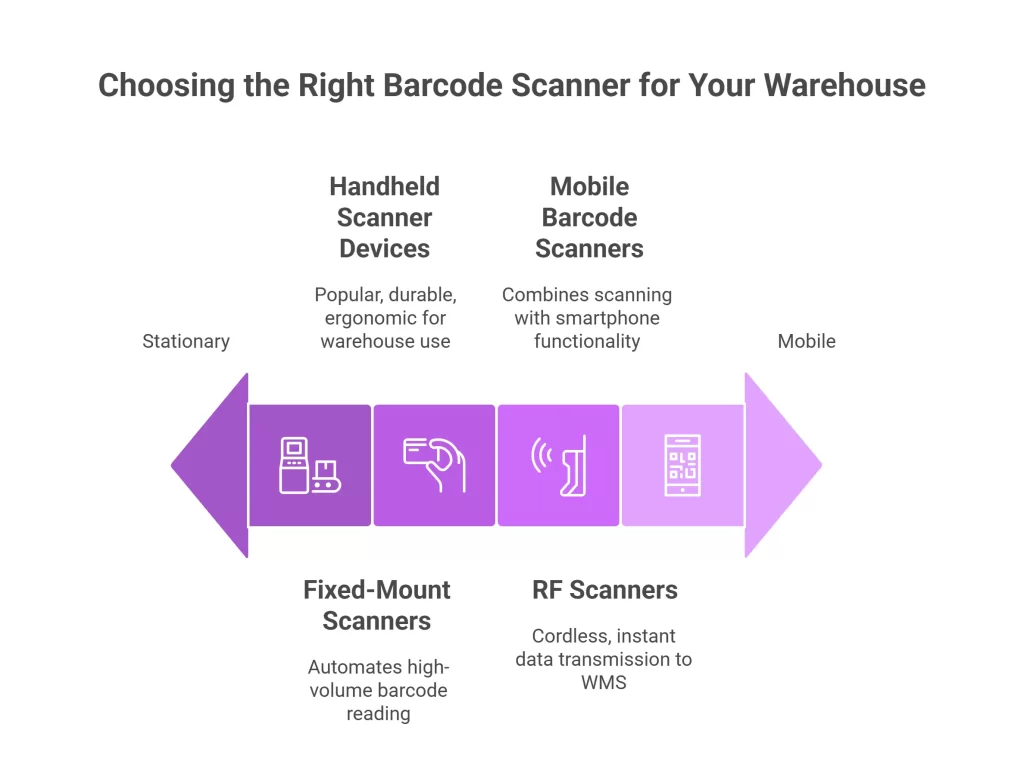
Handheld Scanner Devices
These workhorses remain the most popular choice for warehouse teams. Modern handheld scanner devices can read damaged barcodes, work in low light, and survive drops onto concrete floors.
Look for these features:
- IP54 rating or higher for dust and moisture protection
- Drop specifications of at least 6 feet to concrete
- Ergonomic grip for all-day comfort
- Fast decode speeds (under 100 milliseconds)
RF Scanners and Wireless Barcode Readers
RF scanners communicate directly with your warehouse management system over radio frequency. This means no cables, no sync delays, and freedom to move throughout your facility.
Wireless barcode readers have evolved significantly. Modern units offer:
- Range up to 300+ feet from base stations
- Battery life exceeding 12-hour shifts
- Instant data transmission to your WMS
- Automatic reconnection if signal drops
Mobile Barcode Scanners
Here’s where things get interesting. Mobile barcode scanners—essentially ruggedized smartphones with built-in scanning capabilities—are changing the game. Devices from Zebra and Honeywell combine scanning with full Android functionality.
Why does this matter? Your team can scan items, check inventory levels, receive instructions, and communicate with supervisors—all on one device. Training time drops because everyone already knows how to use a smartphone.
Fixed-Mount Scanners
For high-volume conveyor operations, fixed-mount scanners automatically read barcodes as items pass by. These are typically used at receiving docks and shipping stations where throughput matters most.
Understanding 1D and 2D Barcodes for Warehouse Operations
Your scanner choice partly depends on the barcode types you’re working with. Let’s break down 1D and 2D barcodes without getting too technical.
1D barcodes (the traditional vertical lines) store limited data—usually just a product identifier. They’re cheap to produce, easy to scan, and still dominate retail products.
2D barcodes, including QR codes, pack more information into less space. A single QR code warehouse scanning setup can store:
- Product details
- Lot numbers
- Expiration dates
- Serial numbers
- Origin information
For 3PLs handling products with traceability requirements (think food, pharmaceuticals, or electronics), 2D capability isn’t optional. Make sure your scanners handle both formats—most modern units do. Check out our detailed guide on QR code for inventory and warehouse management to learn more.
Pro tip: If you’re implementing barcode labeling for warehouses on location and bin labels, consider 2D codes. They’re more damage-resistant and can encode location coordinates, zone information, and special handling instructions.
Critical Warehouse Processes Enhanced by Barcode Scanning
Every touch point in your warehouse represents a potential error—or an opportunity for verification. Here’s how inventory tracking barcode systems transform each stage.
Receiving and Putaway Process
The receiving and putaway process sets the tone for everything downstream. Scan incoming items against purchase orders, and discrepancies surface immediately. No more discovering shortages weeks later during cycle counts.
Best practices for receiving:
- Scan each carton or pallet upon arrival
- Verify quantities against advance ship notices (ASNs)
- Flag exceptions in real-time for immediate resolution
- Assign and scan putaway locations to ensure accuracy
When your team scans items into specific bin locations, SKU tracking becomes automatic. Your WMS knows exactly where everything sits—no hunting required.
Pick and Pack Scanning
Pick and pack scanning probably offers the highest ROI in your entire operation. Each scan verifies the right product is going into the right order. Simple, yet incredibly powerful. For a deeper dive into picking strategies, explore our guide to warehouse order picking process methods and types.
Modern pick processes might use:
- Zone picking with barcode verification at each station
- Batch picking with scan-to-sort functionality
- Wave picking coordinated through scanner prompts
- Voice-directed picking combined with barcode confirmation
The key is making scanning part of the natural workflow, not an extra step. When done right, scanning actually speeds up picking by eliminating guesswork and backtracking.
Order Fulfillment Scanning
Order fulfillment scanning connects your physical operations to customer expectations. Each scan generates data that feeds tracking updates, inventory adjustments, and billing calculations.
For 3PLs managing multiple clients, this means:
- Accurate billing based on actual activity
- Client-specific reporting generated automatically
- Proof of fulfillment for dispute resolution
- Real-time status updates for end customers
Shipping Verification
The final scan before an order leaves your building is your last chance to catch errors. Scan the packed order against the shipping label to verify contents match the destination. This single checkpoint prevents costly mis-ships and customer complaints.
Implementing Barcode Scanning in Your 3PL Warehouse
Rolling out a 3PL inventory management system with barcode capabilities isn’t just buying hardware. It’s an operational transformation that requires planning. Learn from others by reading about 3PL WMS mistakes to avoid before starting your implementation.
Step 1: Assess Your Current State
Before selecting equipment, document your existing processes. Where do errors occur most frequently? Which workflows would benefit most from scanning? What integration requirements does your current WMS have?
Talk to your floor staff. They know where the pain points live better than any consultant.
Step 2: Choose Your Hardware Platform
Based on your assessment, determine what types of scanners you need:
- How many simultaneous users will scan?
- What environmental conditions exist (temperature, dust, moisture)?
- Do you need mobile computing capabilities or just scanning?
- What’s your budget for initial deployment and ongoing support?
Leading options include Zebra warehouse scanners and Honeywell barcode scanners for logistics. Both offer excellent reliability, though they have different strengths. Zebra typically excels in mobile computing devices, while Honeywell often leads in pure scanning performance.
Step 3: Plan Your Barcode Infrastructure
Decide what needs barcodes in your warehouse:
- Product labels (often provided by clients)
- Location labels for racks, bins, and floor positions
- License plates for pallets and containers
- Employee badges for activity tracking
- Equipment labels for asset management
Consistency matters. Establish standards for label size, placement, and information encoding before printing thousands of labels. For more insights, read our comprehensive guide on inventory management with barcode technology.
Step 4: Integrate with Your WMS
WMS integration is where your barcode system becomes powerful. Without integration, you’re just creating digital data that still requires manual entry. With integration, every scan automatically updates inventory, triggers workflows, and generates records.
Most modern warehouse management systems offer native barcode support. However, WMS barcode integration quality varies significantly. Ask vendors specific questions:
- What scanner brands and models are certified?
- Is the integration real-time or batch-based?
- How are scanning exceptions handled?
- What customization options exist for scan workflows?
Cloud-based warehouse scanning solutions often provide easier integration paths and automatic updates, though they require reliable internet connectivity. Explore our detailed breakdown of top WMS integration types and benefits for more guidance.
Step 5: Train and Launch
Technology only works when people use it correctly. Invest in thorough training that covers:
- Proper scanning technique (angle, distance, speed)
- Exception handling when scans fail
- Troubleshooting common device issues
- Understanding why scanning matters for accuracy
Consider a phased rollout—start with one area or process, work out the kinks, then expand. This approach identifies problems before they affect your entire operation.
Barcode vs RFID: Which Makes Sense for Your Operation?
You’ve probably heard RFID touted as the future of warehouse technology. So why are we talking about barcodes? Let’s compare barcode vs RFID for warehouse applications honestly. For a complete breakdown, check out our article on RFID for inventory management pros and cons.
Barcodes win on:
- Cost per label ($0.01-$0.05 vs $0.10-$0.50 for RFID)
- Implementation simplicity
- Universal adoption and standardization
- Precise item-level scanning
RFID wins on:
- Speed for bulk reading (no line-of-sight required)
- Automated inventory counting
- Tracking items without manual intervention
- Durability in harsh environments
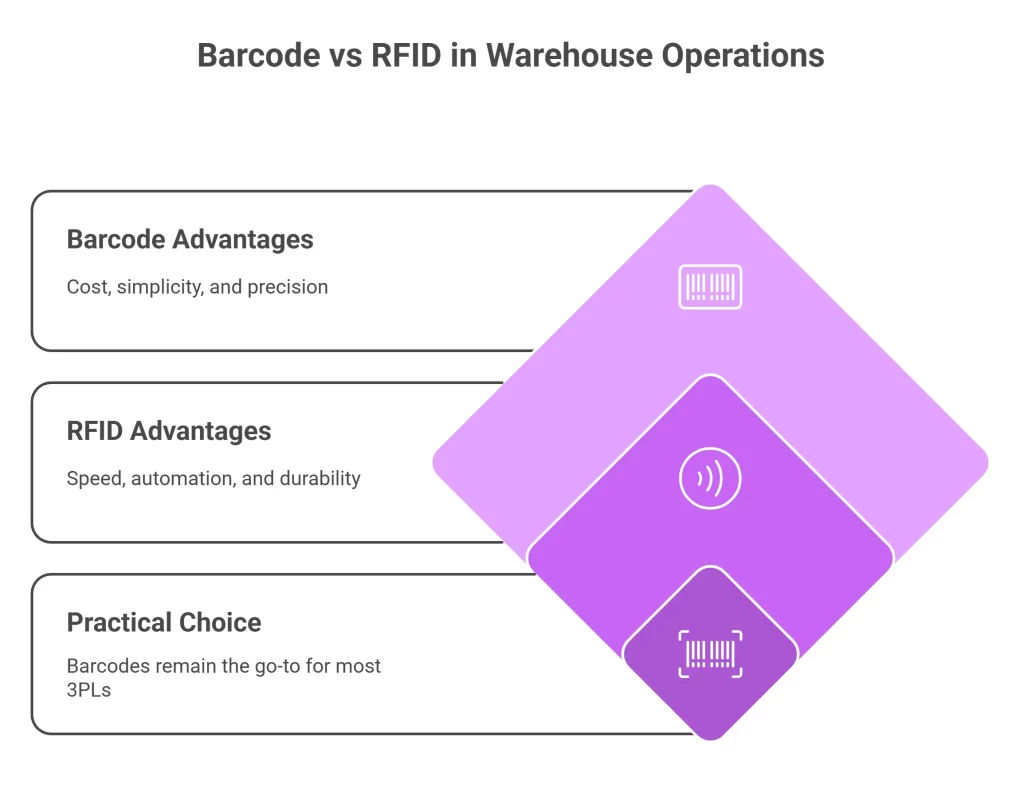
For most 3PLs, barcodes remain the practical choice. RFID makes sense for specific use cases—high-value inventory, automated cycle counting, or clients who mandate it.
Many warehouses successfully combine both technologies, using RFID for receiving and inventory counts while relying on barcodes for pick and pack scanning precision.
Best Practices for Warehouse Barcode Labeling
Your scanning system is only as good as the barcodes you’re scanning. Poor label quality causes frustration, slowdowns, and workarounds that defeat the purpose of your investment.
Label Placement Standards
- Position location labels at consistent heights (typically 48-54 inches from floor)
- Ensure adequate lighting at scan points
- Angle labels slightly toward the scanning direction
- Avoid placing labels where they’ll be obscured by products
Print Quality Matters
Invest in industrial label printers capable of producing high-contrast, durable labels. Thermal transfer printing typically outperforms direct thermal for warehouse environments.
Key specifications:
- Minimum 203 DPI resolution (300 DPI preferred for 2D codes)
- Synthetic label materials for durability
- Fade-resistant ribbons for long-term readability
Standardize Your SKU Tracking
Work with clients to establish barcode labeling best practices for incoming products:
- Minimum barcode size requirements
- Preferred barcode symbologies
- Label placement on cartons and items
- Requirements for damaged or missing labels
Future-Proofing Your 3PL Barcode Investment
Technology evolves rapidly. How do you invest wisely today while preparing for tomorrow?
Mobile WMS Scanning Apps
Mobile WMS scanning apps running on standard smartphones offer compelling economics. Using employees’ personal devices (with proper security controls) or inexpensive consumer-grade tablets can reduce hardware costs by 60-70%.
The trade-off? Durability and scanning speed. For lower-volume operations or supplemental scanning needs, mobile apps work great. High-volume picking still benefits from purpose-built devices.
Warehouse Automation Integration
As your operation grows, barcode scanning integrates with emerging warehouse automation technologies:
- Autonomous mobile robots that read location barcodes
- Automated conveyor systems with integrated scanning
- Pick-to-light systems triggered by scan events
- Robotic arms that verify picks through scanning
Building your barcode infrastructure on open standards ensures compatibility with future automation investments.
Supply Chain Visibility Trends
Supply chain visibility extends beyond your four walls. Barcode data feeds into track-and-trace systems that follow products from manufacturer to end customer. Your scanning data becomes part of a larger ecosystem. Discover the latest developments in our inventory visibility in 2025 guide.
Clients increasingly want visibility into your operations. Real-time dashboards showing inventory positions, fulfillment progress, and shipping status differentiate leading 3PLs from the rest.
Conclusion
Implementing effective warehouse barcode scanning isn’t complicated, but it does require thoughtful planning. From selecting the right barcode scanner for warehouse conditions to ensuring seamless WMS integration, each decision impacts your operational efficiency and client satisfaction.
The investment pays off. Improved inventory accuracy, faster fulfillment, and real-time visibility aren’t just operational benefits—they’re competitive advantages that help retain clients and win new business.
Start by assessing your current pain points. Talk to your team, evaluate your processes, and identify where scanning will deliver the biggest impact. Then build from there.
Ready to take your warehouse operations to the next level? Explore AI-powered inventory management tools and smart warehouse solutions that build on barcode scanning foundations. Modern platforms combine scanning data with artificial intelligence to predict demand, optimize picking routes, and identify efficiency opportunities you might miss. The technology exists—now it’s time to put it to work for your 3PL.
Frequently Asked Questions
Barcode scanning eliminates manual data entry errors by creating verified, timestamped records of every item movement. This pushes inventory accuracy rates above 99.5%—compared to 85-95% with manual systems
RF scanners are rugged, dedicated devices focused on scanning with longer battery life. Mobile barcode scanners are industrial smartphones with scanning capabilities, running full operating systems and supporting apps for broader functionality
Absolutely. Small 3PLs often see greater proportional benefits since each error impacts them more. Cloud-based solutions offer subscription pricing, making enterprise-quality barcode technology accessible for under $5,000
Basic implementations take 4-8 weeks, covering hardware setup, label printing, and staff training. Complex deployments with new WMS software or multi-location rollouts may require 3-6 months
Zebra excels in mobile computing platforms with Android integration, while Honeywell often leads in pure scanning performance for damaged barcodes. Request demo units to test in your specific warehouse environment before deciding

Kapil Pathak is a Senior Digital Marketing Executive with over four years of experience specializing in the logistics and supply chain industry. His expertise spans digital strategy, search engine optimization (SEO), search engine marketing (SEM), and multi-channel campaign management. He has a proven track record of developing initiatives that increase brand visibility, generate qualified leads, and drive growth for D2C & B2B technology companies.